Table of Contents
- Why Create Your Own Email Server?
- Advantages and Disadvantages
- Requirements Before Starting
- Configuring DNS Records
- Setting Up MX Records
- Configuring DKIM
- Setting Up SPF Records
- DMARC and Email Security
- Choosing a Mail Server Application
- SMTP, POP3, and IMAP Setup
- Testing Your Email Server
- Whitelisting Your Mail Server
- Using SMTP Relay Services
- Frequently Asked Questions
Creating your own email server may sound complicated, but it can provide powerful benefits for businesses, developers, and advanced users.
A self-hosted email server gives you complete control over your email infrastructure, users, security, and communications.
Instead of relying entirely on third-party providers, you can create professional email addresses such as:
This guide explains how to build a fully functional self-hosted email server using free software and proper DNS configuration.
Why Create Your Own Email Server?
Many businesses and developers choose to host their own mail servers for privacy, flexibility, and scalability.
Main Reasons to Self-Host Email
- Professional custom email addresses
- Unlimited email accounts
- Greater privacy and control
- No per-user subscription fees
- Full ownership of communication data
Self-hosted email systems are especially useful for small businesses that want professional communication without expensive recurring email hosting costs.
Advantages and Disadvantages
Advantages
- Full control over your email system
- Custom domain branding
- Unlimited user creation
- Advanced mail routing options
- Independent infrastructure
Disadvantages
- Requires technical knowledge
- Server maintenance responsibility
- Potential spam blacklist issues
- Security management complexity
- DNS configuration requirements
Managing your own email infrastructure requires ongoing administration and security awareness.
Requirements Before Starting
Before setting up a mail server, several requirements must be prepared correctly.
Basic Requirements
- Public static IP address
- Registered domain name
- DNS management access
- Server or VPS hosting
- Mail server software
Why a Static IP Matters
Your mail server should use a public static IP address so other mail servers can reliably identify your domain.
Dynamic IP addresses are often blocked or flagged by spam protection systems.
Configuring DNS Records
DNS configuration is one of the most important steps in email server setup.
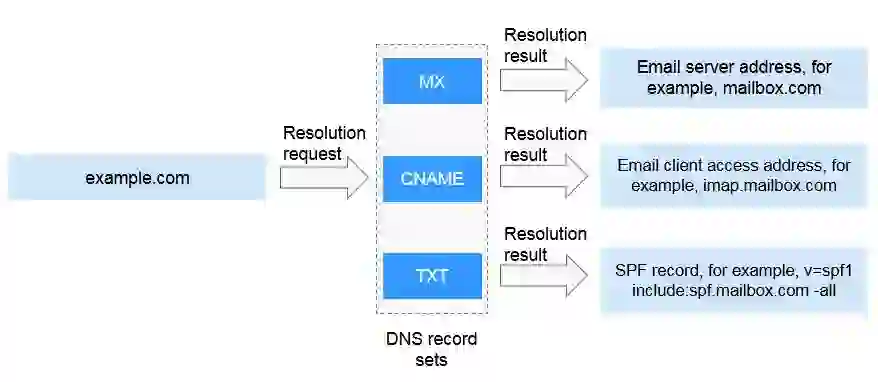
Your domain’s DNS records tell other servers where emails should be delivered and how to verify message authenticity.
Important DNS Records
- MX records
- SPF records
- DKIM records
- DMARC records
- PTR (Reverse DNS)
Setting Up MX Records
MX (Mail Exchange) records specify which mail server handles email delivery for your domain.
Example MX Record
Type: MX
Host: @
Value: mail.yourdomain.com
Priority: 10
TTL: 1 min
This tells external mail servers to deliver emails to your mail server.
Configuring DKIM
DKIM (DomainKeys Identified Mail) helps verify that emails are authentic and untampered.
DKIM works using:
- Private key
- Public key
- Digital signatures
Generate DKIM Keys Using OpenSSL
openssl genrsa -out private.key 2048
openssl rsa -in private.key -pubout -outform der
Example DKIM TXT Record
v=DKIM1; k=rsa; p=PUBLIC_KEY
Correct DKIM setup improves email deliverability and reduces spam classification.
Setting Up SPF Records
SPF (Sender Policy Framework) tells receiving mail servers which IP addresses are authorized to send emails for your domain.
Example SPF Record
v=spf1 a mx -all
SPF reduces spoofing and phishing attempts while improving trust with providers such as:
- :contentReference[oaicite:5]{index=5} Gmail
- Outlook
- Yahoo Mail
DMARC and Email Security
DMARC (Domain-based Message Authentication, Reporting, and Conformance) works together with SPF and DKIM to improve email authentication.
Benefits of DMARC
- Protects against spoofing
- Improves email trust
- Provides reporting tools
- Enhances deliverability
Modern email systems strongly recommend using DMARC policies.
Choosing a Mail Server Application
Several free mail server applications are available depending on your operating system.
Popular Mail Server Software
- :contentReference[oaicite:6]{index=6} (Windows)
- Exim
- Postfix
- iRedMail
- Dovecot
For Windows environments, many users prefer hMailServer because it is lightweight and beginner-friendly.
SMTP, POP3, and IMAP Setup
SMTP Configuration
SMTP is used for sending and receiving outgoing email.
Recommended SMTP Ports
- 25 → Incoming server communication
- 587 → Secure client submission
- 465 → Legacy SSL/TLS support
POP3 and IMAP
These protocols allow email clients to retrieve and manage messages.
Recommended Secure Ports
- 993 → IMAP SSL/TLS
- 995 → POP3 SSL/TLS
Secure SSL/TLS connections are strongly recommended for all modern email systems.
Testing Your Email Server
After configuration, testing your server is essential.
Ways to Test Email Deliverability
- Send emails to Gmail
- Check DKIM and SPF validation
- Use online blacklist checkers
- Verify DNS propagation
Useful Testing Tools
- :contentReference[oaicite:7]{index=7}> Gmail Header Analyzer
- AppMailDev
- DKIMValidator
- PowerDMARC
- MXToolBox
Successful email validation helps avoid spam folders and rejected deliveries.
Whitelisting Your Mail Server
Even properly configured servers can sometimes appear on spam blacklists.
Why Blacklisting Happens
- Shared hosting IP reputation
- Spam activity from neighboring IPs
- Misconfigured DNS records
- Missing authentication
Use blacklist checking services to monitor your server reputation regularly.
Using SMTP Relay Services
If your server experiences delivery issues, SMTP relay services can help improve deliverability.
Popular SMTP Relay Providers
- MailerSend
- Sendinblue
- Mailgun
- Amazon SES
These services act as trusted intermediaries that forward outgoing email through high-reputation infrastructure.
Final Thoughts
Running your own email server gives you complete ownership and flexibility over your email communications.
Although setup requires technical effort, the benefits can be substantial for businesses and advanced users.
By properly configuring:
- DNS records
- SPF
- DKIM
- DMARC
- SMTP security
you can create a reliable and professional self-hosted email solution.
With proper maintenance and security practices, self-hosted email servers remain a powerful alternative to expensive cloud email platforms.
Frequently Asked Questions
Can I create my own email server for free?
Yes, you can use free mail server software such as hMailServer, Postfix, or iRedMail.
Why do I need SPF and DKIM?
SPF and DKIM help verify email authenticity and improve deliverability.
What is the difference between POP3 and IMAP?
POP3 downloads emails locally, while IMAP synchronizes emails across multiple devices.
Can a self-hosted email server send emails to Gmail?
Yes, but proper DNS configuration and reputation management are required.
Why are my emails going to spam?
This may happen because of missing authentication records, poor IP reputation, or blacklist issues.
Helpful Resources:
If there’s a must create your personal electronic mail server to your firm or private use without cost (it’s precise for small companies) so this data provides the focus. Consequently, the mail will be despatched over the world by way of your free mail server for the area.
Why may we make our personal electronic mail server?
Execs
-
Our personal mail area
Sending an organization’s mail from its area is a good suggestion to be enterprise engaging. E.g. gross [email protected].
-
Limitless customers
We are able to create as many customers as we wish with out further pay.
-
Limitless focusing on
Limitless goal addresses whereas sending mail. In exterior paid companies now we have to pay per consumer.
-
All the information is underneath our management
No person will have the ability to see our inner enterprise dialog.
-
Transmission management
Some public mail servers couldn’t ship mail to some domains, e.g. protonmail.com attributable to nation limitations. Internet hosting your personal electronic mail server provides us the power to handle such limitations.
Cons
-
Help effort
Sure, this is identical headache as establishing our personal net server akin to retaining the service on-line, administration, and many others.
-
Handbook setup
Particular information is required to arrange all correctly. However, if you’re prepared for this, we’ll give it on this article.
-
Most likely sending limitations
Some static deal with ranges will be blacklisted. However there’s a solution to avoid this.
There are three predominant steps to ascertain and arrange a self-hosted mail server.
- Setting up IP and DNS.
- Choosing and running a mail server application.
- Whitelisting your own email server.
Establishing IP and DNS
Guarantee public static IP, public area, and PTR report#
These are the primary necessities to run your personal electronic mail server.
-
Public and static IP deal with
The IP deal with of our personal electronic mail server needs to be public and the identical in time. Guarantee it out of your internet hosting or web service supplier.
-
The area identify factors to the IP
DNS report of the general public domain name of our own mail server ought to level to that IP deal with. It may be managed underneath the DNS settings of your area identify supplier.
-
The IP factors to the area identify
Additional, the again DNS report (named PTR) should level our IP to the area identify of our personal mail server. You possibly can ask your internet hosting or web service supplier to arrange it to your public area identify. It may be simply checked by your IP by way of a particular on-line checker like this, or Home windows’s ‘nslookup’ device and ‘host‘ command in UNIX-based programs.
Configure DNS MX report
A mail exchanger report (MX) specifies the mail server liable for accepting electronic mail messages on behalf of a website identify.
So, we have to level area identify of our self-hosted mail server that may course of mail of our predominant area. E.g. if our area is mycompany.com, the mail server is mail.mycompany.com, then the DNS report for mycompany.com might be:
| Sort | Host | Worth | Precedence | TTL |
|---|---|---|---|---|
| MX | @ | mail.mycompany.com | 10 | 1 min |
the place:
- Precedence is used when our area has a couple of mail server.
- TTL will be set to any preferable worth and the bottom worth is used to use DNS modifications as quickly as doable whereas establishing our personal electronic mail server.
Configure DNS DKIM report
DomainKeys Recognized Mail (DKIM) is an electronic mail safety protocol that attaches an encrypted digital signature to an electronic mail. The receiving server verifies it with a public key to make sure the e-mail hasn’t been tampered with.
So, we’d like personal and public keys. It may be generated by a web-based device like Power DMARC Toolbox – DKIM Record Generator, or by OpenSSL instructions (supplied for Home windows):
-
Create personal key
openssl.exe genrsa -out personal.key 2048
- Create public key from personalopenssl.exe rsa -in personal.key -pubout -outform der 2>nul | openssl.exe base64 -A > public.key.txt
And our DNS report will appear to be this:
| Sort | Host | Worth | TTL |
|---|---|---|---|
| TXT | selector._domainkey | v=DKIM1; ok=rsa; p=public_key | 1 min |
the place:
- selector – self-chosen identifier e.g. ‘mysrv’ that might be utilized in our mail server application.
- public_key – our public key encoded by base64 algorithm.
- TTL has the identical which means as within the previous paragraph.
Configure DNS SPF report
Sender Coverage Framework (SPF) is an electronic mail authentication commonplace that checks the sender’s IP deal with in opposition to an inventory of the area proprietor’s approved IPs to validate incoming electronic mail.
Our DNS report will appear to be this:
| Sort | Host | Worth | TTL |
|---|---|---|---|
| TXT | @ | v=spf1 a mx embody:relayer_name -all | 1 min |
- relayer_name – non-obligatory exterior mail relay server identify.
- TTL has the identical which means as within the previous paragraph.
The useful SPF report online generator can be utilized.
Elective DNS stuff
Some fields aren’t essential however good to have.
-
DMARC
Area-based Message Authentication, Reporting, and Conformance (DMARC) report allows our hosted personal electronic mail server to declare a coverage on how different electronic mail servers ought to react to inauthentic messages.
-
BIMI
Model Indicators for Message Identification (BIMI) is a brand new commonplace created to make it simpler to get our brand displayed subsequent to our message within the inbox. Moreover, BIMI is designed to stop fraudulent emails and help deliverability as effectively.
-
TLS-RPT
TLS Reporting (TLS-RPT) provides every day combination experiences with data on emails that don’t get encrypted and fail to ship.
-
MTA-STS
Mail Switch Agent Strict Transport Safety (MTA-STS) is a brand new commonplace that goals to enhance the safety of SMTP by enabling domains to decide into strict transport layer safety mode that requires authentication and encryption.
All these data besides MTA-STS will be generated by way of Power DMARC Toolbox. Configuration of MTA-STS is just like Google and at last will be checked by Hardenize.
Selecting and operating a mail server utility
Examine that your internet hosting permits putting in different software program. If that’s the case, any applicable electronic mail server utility can be utilized. E.g. there’s a free hMailServer for Home windows that gives all wanted capabilities with minimal useful resource utilization. For UNIX-based programs, there are lots of free electronic mail servers akin to Exim Internet Mailer or iRedMail.
You’re welcome to place one other good software program within the feedback below. Detailed selecting of such software program deserves a separate article.
For Home windows, we advocate utilizing hMailServer attributable to its correlation with our principles of small and effective software.
Initializing
When the software program is chosen and put in, it’s a time establishing your personal electronic mail server utility.
-
Area and customers
We must always add customers of our free mail server for the area. They are often added or eliminated at any time.
-
Safety
To offer an applicable stage of safety we must always add an SSL certificates for our area.
-
Subsequent, DKIM needs to be configured. We have to add the personal key and selector obtained above. Additionally, header and physique strategies needs to be set to ‘relaxed’, signing algorithm needs to be set to ‘SHA256’ for compatibility with trendy mail transmission checking.
-
Spam safety
Lastly, don’t overlook to arrange antispam checking by particular blacklist hosts akin to spamhaus.org to guard our mail server customers from spam messages.
E-mail protocols
We must always arrange three e-mail protocols which might be wanted to ship and obtain mail.
SMTP#
SMTP is used to obtain incoming and ship outgoing mail from/to different mail servers. And it permits our area customers to ship their messages.
-
25 port
This port is required to handle incoming connections from different mail servers. The safe technique needs to be set to STARTTLS.
-
587 port
It’s wanted for the mail purchasers of our personal mail server. The safe technique needs to be set to STARTTLS.
-
465 port
It may be wanted for the legacy mail purchasers of our self-hosted mail server. So, the safe technique needs to be set to SSL/TLS.
POP3, IMAP
POP3 and IMAP are utilized by separate mail purchasers like Outlook on PC or any mail shopper on our mobiles. It permits our area customers to handle their messages.
The 993 port needs to be used for secured IMAP connections and 995 for POP3. The safe technique needs to be set to SSL/TLS (not STARTTLS) to be appropriate with most purchasers.
The ports 143 for IMAP and 110 for POP3 will be set as effectively however they don’t seem to be beneficial to be used attributable to their insecurity.
Checking
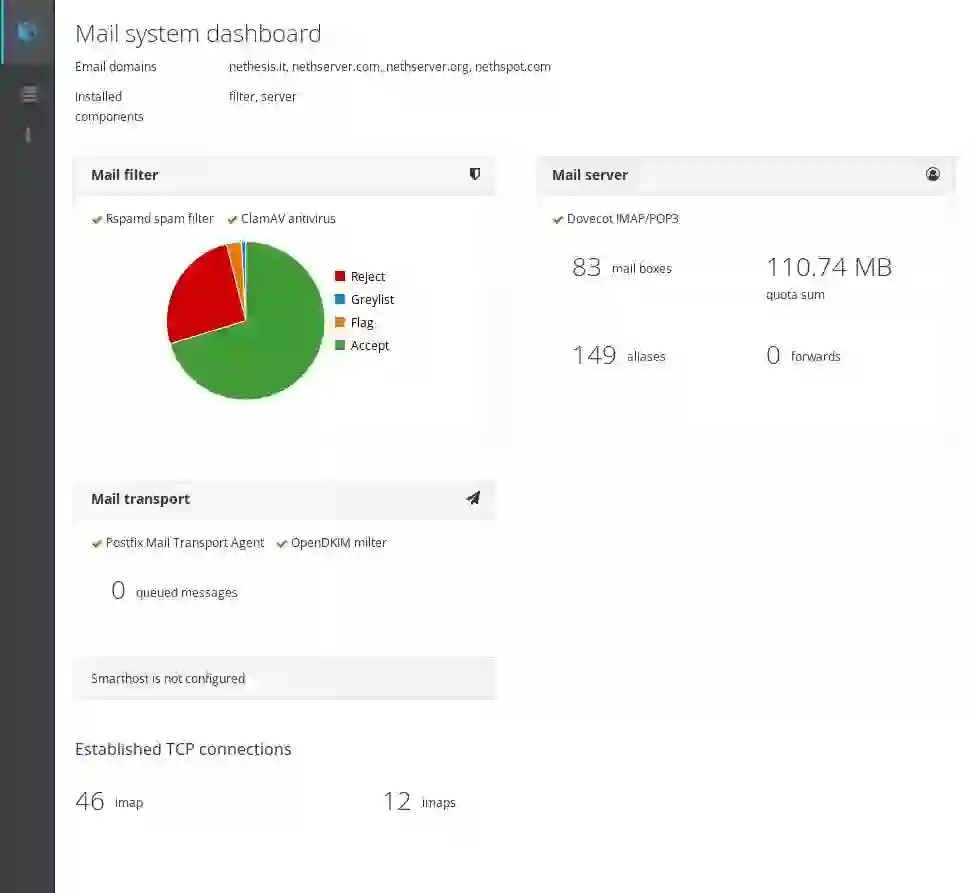
So, when all is about up, we are able to take a look at our personal electronic mail server by sending an electronic mail to anyone from our customers’ listing. Moreover, some electronic mail utility has self-diagnostic like hMailServer that reveals the work-ready standing of all subsystems (see beneath).
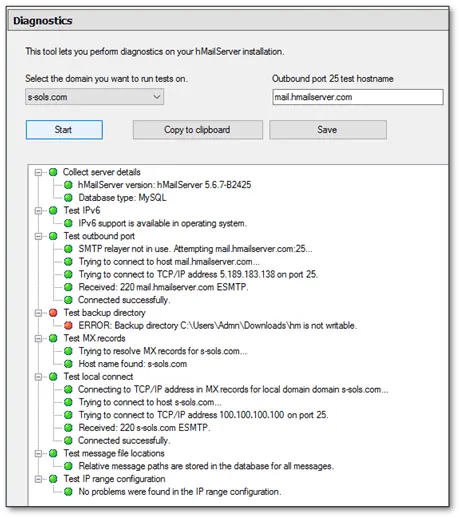
Now, it’s time to verify sending to an exterior deal with.
Gmail.com account
If now we have a Gmail.com account, we are able to additionally ship a take a look at electronic mail to our Gmail deal with. Then open our electronic mail in Gmail webmail, click on ‘present particulars’.
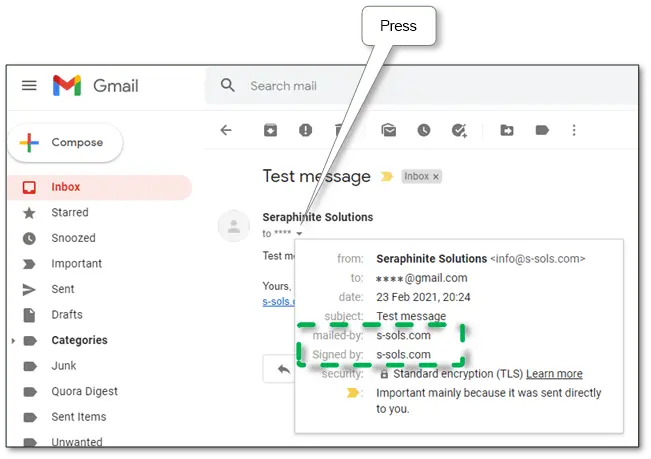
If there’s ‘signed-by: our area’, our DKIM signature is effectively configured. If there’s ‘mailed-by: our area’, our SPF is OK.
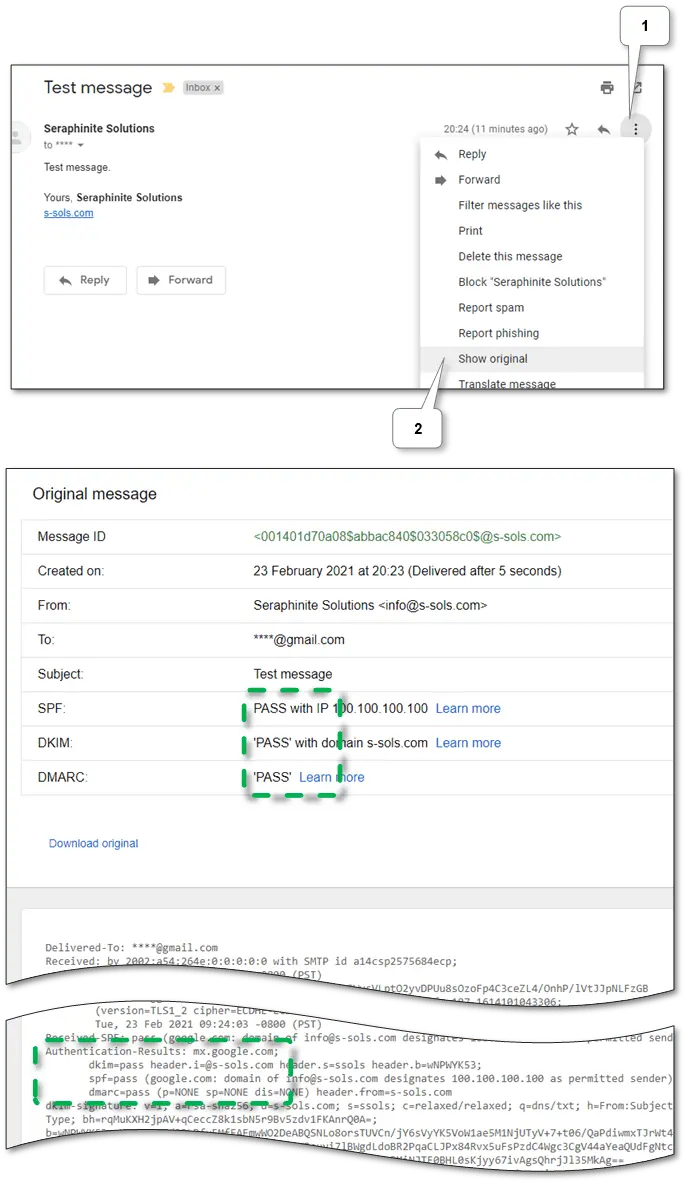
Then, guarantee handed verification standing of our sending within the uncooked headers.
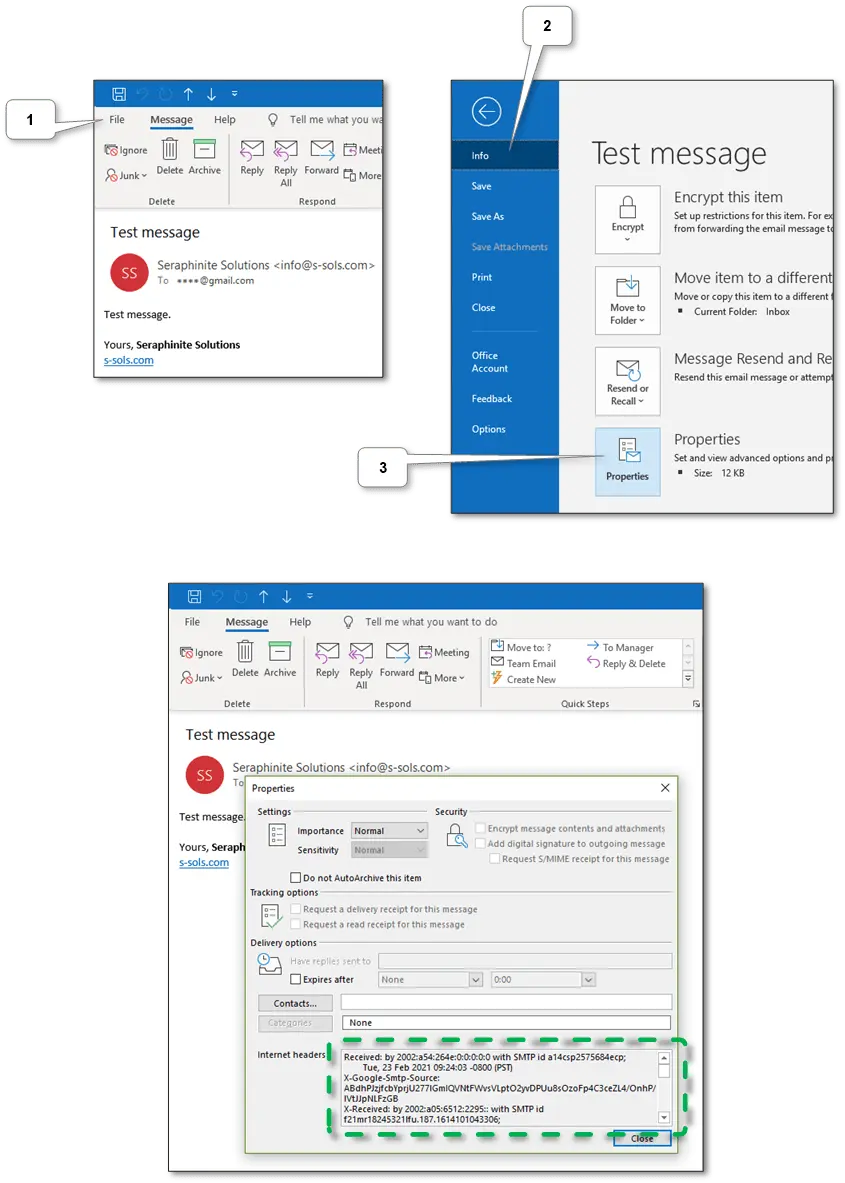
Additionally, in Outlook we are able to see the identical headers within the message properties.
Particular on-line companies
There are a variety of on-line companies that may verify electronic mail sending. Under are a few of them.
-
This service permits testing electronic mail server configuration akin to DKIM and SPF by sending the e-mail to supplied generated mail deal with. We’d like simply to comply with the on-screen directions and the take a look at outcomes might be displayed there.
-
Offers the identical performance because the earlier service. The take a look at outcomes might be despatched to the sender’s deal with.
-
To check message sending right here we have to send a special message to [email protected]. The take a look at outcomes might be despatched to the sender’s deal with.
-
This service gives solely lite checking of all attributes, but it surely has the handy tools listed above.
So, if all are configured accurately however our server exists in spam blacklists we must always whitelist our own mail server. See beneath.
Whitelisting your personal electronic mail server
So, if all talked about above are tuned accurately, different electronic mail servers nonetheless may mark messages as spam and reject them. It occurs when the IP (or its vary) of our area is included in some blacklist. Probably the most typically motive for that’s some neighbor IPs have been used to ship spam messages.
Whitelisting in most identified sources
So first, let’s verify IP (and area if essential) on-line for existence in any blacklists. E.g. it may be checked in any on-line checker that may be discovered by way of search. E.g. MXToolBox does checking in the preferred blacklists. And we advocate checking it in multirbl.valli.org too attributable to it reveals many blacklist sources and present belief of every one.
Then, we must always sequentially have a look at every outcome merchandise and browse suggestions on easy methods to whitelist our IP in a specific blacklist supply. However not all of them can permit to do it without cost, for instance, UCEPROTECT ® -Network.
Whitelisting specifically mail servers
Some servers like Outlook have their very own blacklists. The checking is straightforward – your mail server app will notify you about failed supply within the mail shopper. Most mail servers present unblock URLs within the response. So, we have to go by such URLs and comply with the directions like this.
Bypassing blacklists
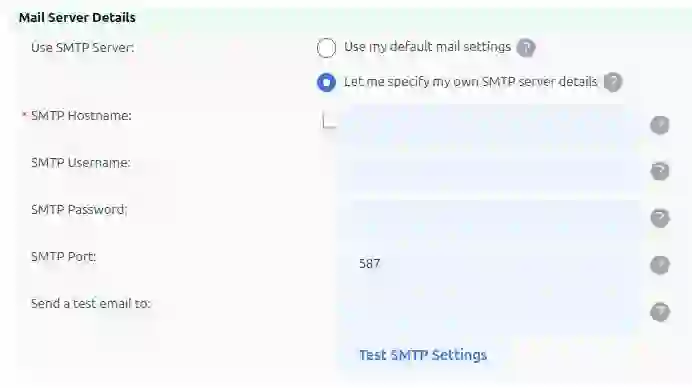
If some official blacklist doesn’t permit whitelisting or sometime mail stops sending to a specific electronic mail area – don’t panic – we are able to use exterior SMTP relay services. They permit use them as gateways or proxies whereas sending mail.
-
We advocate utilizing it as the most cost effective – it permits sending 20K emails without cost per thirty days and has a low cost for further sending. Peculiarity: CC and BCC fields haven’t been supported but.
-
It’s one other good service that permits sending 9K emails without cost per thirty days with a restrict of 200 per day. Peculiarity: embedded e-mail monitoring can’t be turned off.
In every service, we must always register and get approve of our mail server domain. After approving, every one gives directions on what needs to be adjusted to our DNS and our own mail server application setting. For DNS it’s a DKIM, SPF, and DMARK settings, for utility is an SMTP relay server deal with, port, and credentials.
Conclusion
So, now we are able to use all benefits of operating your personal electronic mail server. We hope that this materials will make it easier to attain your objective most effectively. In case you have any questions or solutions in keeping with this theme welcome to the dialogue in our feedback or by way of our email.