Table of Contents
- What Is a 503 Service Unavailable Error?
- How HTTP Status Codes Work
- Main Causes of 503 Errors
- Check Server Resource Usage
- Check Server Maintenance
- Stop Ongoing Processes
- Reset Firewall Configuration
- Check Server Logs
- Restart Server and Network Equipment
- Clear DNS Cache
- How to Prevent 503 Errors
- Frequently Asked Questions
The 503 Service Unavailable error is one of the most common server-side problems website owners encounter.
When this error appears, it usually means that the web server is temporarily unable to process incoming requests.
Unlike other server errors, the 503 error indicates that the server itself is still functioning properly, but it is currently overloaded, under maintenance, or unable to handle additional traffic.
If left unresolved, this issue can negatively impact:
- Website availability
- User experience
- SEO rankings
- Google indexing
- Website revenue
In this complete guide, you will learn what causes the HTTP 503 error and how to fix it effectively.
What Is a 503 Service Unavailable Error?
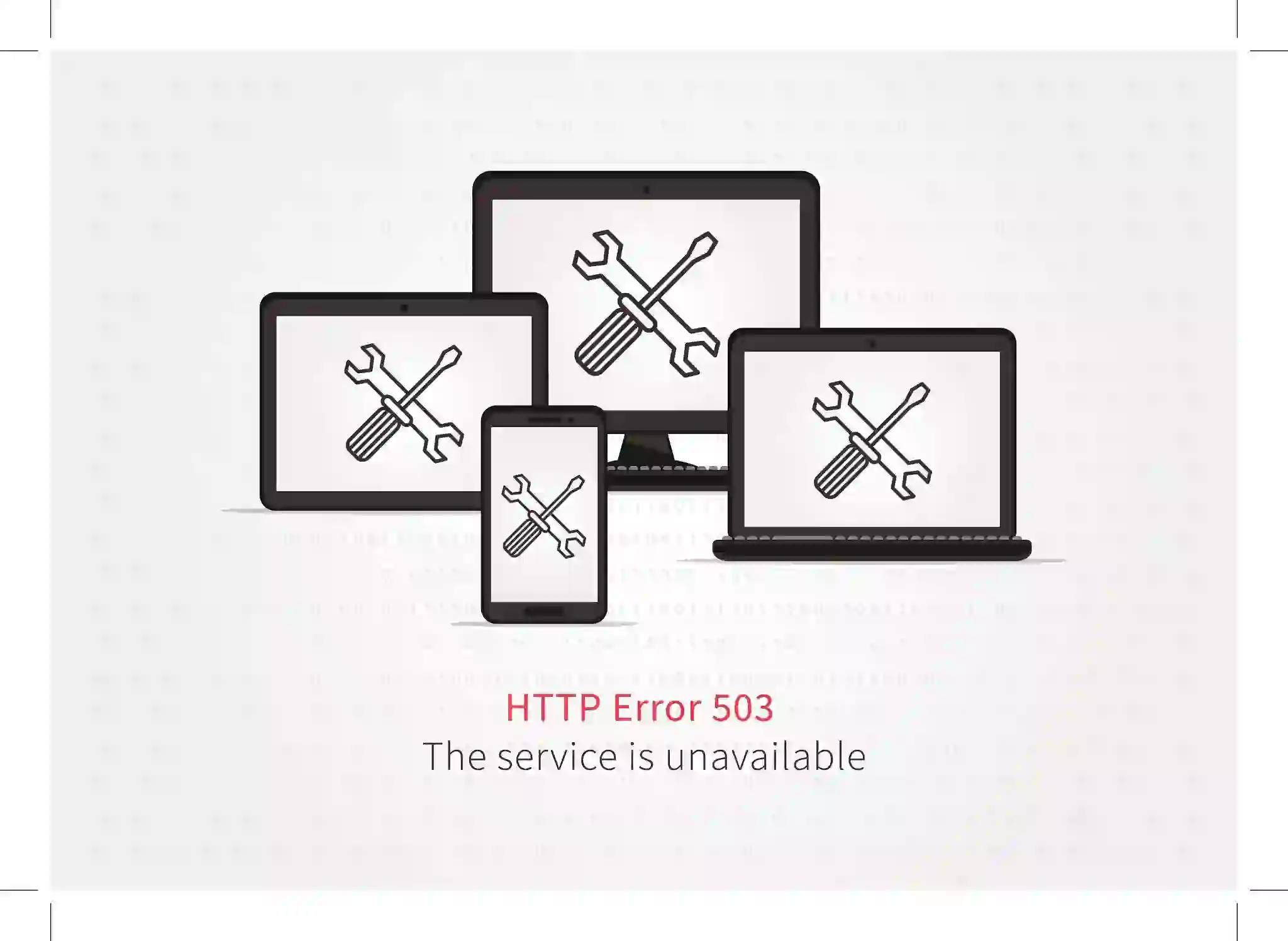
The 503 Service Unavailable error is an HTTP status code that indicates the server is temporarily unable to handle requests.
Common variations include:
- 503 Service Unavailable
- Error 503 Service Unavailable
- 503 Service Temporarily Unavailable
- HTTP Error 503
- HTTPS Error 503
- HTTP Server Error 503
This error belongs to the 5xx family of HTTP server errors.
Unlike 404 or 403 errors, which usually involve missing resources or permission issues, the 503 error mainly relates to server overload or temporary downtime.

How HTTP Status Codes Work
Whenever a visitor accesses a website, the browser sends an HTTP request to the hosting server.
The server then responds with:
- The requested webpage
- An HTTP status code
Examples of HTTP Status Codes
- 200 OK — Successful request
- 301 Redirect — Permanent redirect
- 404 Not Found — Missing page
- 500 Internal Server Error — Server failure
- 503 Service Unavailable — Temporary server overload
When a server cannot process requests temporarily, it returns the 503 response.
Main Causes of 503 Errors
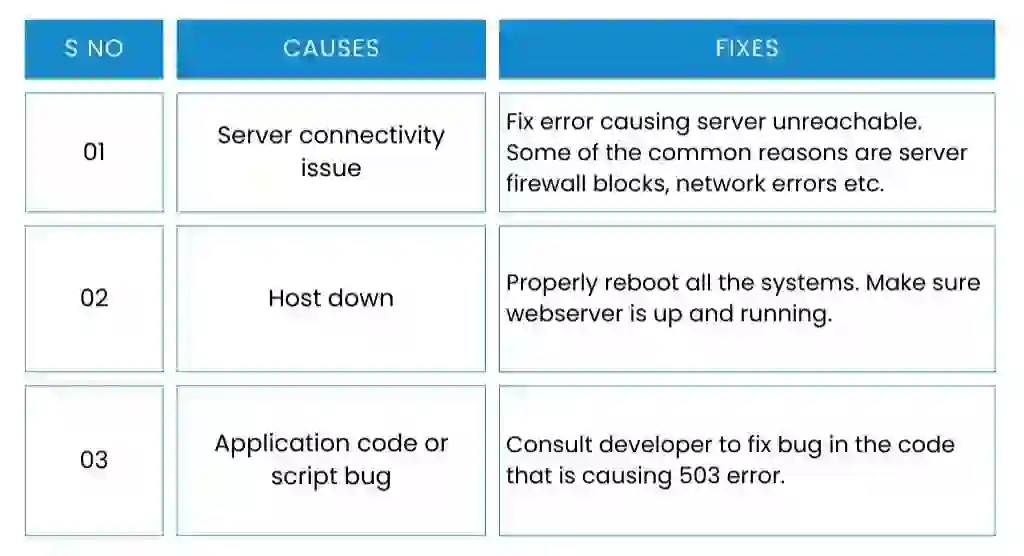
Several server-related problems can trigger a 503 Service Unavailable error.
Most Common Causes
- High traffic spikes
- Server resource exhaustion
- Plugin or theme conflicts
- Scheduled server maintenance
- DDoS attacks
- Firewall configuration issues
- DNS problems
- Too many running processes
Understanding the root cause is the first step toward resolving the issue effectively.

Check Server Resource Usage
One of the most common causes of 503 errors is excessive server resource consumption.
Important Server Resources
- CPU usage
- RAM usage
- Bandwidth
- Input/Output operations
- Concurrent processes
- HTTP requests
Shared hosting environments are especially vulnerable because resources are shared between multiple users.
How to Monitor Resources
Most hosting providers offer resource monitoring inside cPanel or hosting dashboards.
Monitoring unusual traffic spikes can help identify overload situations before the website crashes.
Check Server Maintenance
Hosting companies frequently perform scheduled maintenance to improve security, stability, and performance.
During maintenance periods, temporary 503 errors may appear.
Signs of Maintenance-Related 503 Errors
- Short downtime periods
- Hosting company announcements
- Temporary service interruptions
If you suspect maintenance is causing the problem, contact your hosting provider for confirmation.
Stop Ongoing Processes
Too many running processes can overload the server and trigger a 503 error.
This commonly happens on websites with:
- Heavy plugins
- Poorly optimized scripts
- Traffic surges
- Resource-intensive applications
How to Stop Processes
Shared hosting users can usually terminate running processes through the hosting control panel.
VPS or dedicated server users may stop processes through SSH commands.
Keep in mind that stopping processes is only a temporary solution until the underlying issue is fixed.
Reset Firewall Configuration
A Web Application Firewall (WAF) protects websites against malicious traffic.
However, incorrect firewall configurations can sometimes block legitimate requests.
Firewall Problems May Cause
- False positives
- Blocked CDN traffic
- Connection interruptions
- HTTP 503 responses
Resetting or reviewing firewall rules may help restore website access.

Check Server Logs
Server logs contain valuable information about website activity and server errors.
Reviewing logs can help identify:
- Plugin failures
- PHP errors
- Resource exhaustion
- Malicious traffic
- Application crashes
Most hosting providers offer access to error logs through cPanel or server dashboards.
Restart Server and Network Equipment
Sometimes the issue originates from temporary communication failures between servers and network infrastructure.
Restarting Can Fix
- Server connection issues
- Temporary network interruptions
- Overloaded services
- Memory leaks
Restarting the server may restore normal operations quickly.
Clear DNS Cache
DNS-related problems can also cause HTTP 503 errors.
Examples include:
- Corrupted DNS cache
- DNS propagation delays
- Unresponsive DNS servers
Clear DNS Cache on Windows
ipconfig /flushdns
Clear DNS Cache on macOS
sudo killall -HUP mDNSResponder
After clearing the cache, restart your browser and test the website again.
How to Prevent 503 Errors
Preventing server overload is the best long-term solution.
Best Prevention Practices
- Use high-quality hosting
- Optimize website plugins
- Enable caching systems
- Use a CDN
- Monitor server resources
- Limit unnecessary processes
- Perform regular maintenance
- Keep software updated
Proper website optimization significantly reduces the chances of future server downtime.
Final Thoughts
The 503 Service Unavailable error is a temporary server-side issue that commonly occurs because of overload, maintenance, or configuration problems.
Although frustrating, most 503 errors can be fixed by checking resource usage, stopping overloaded processes, reviewing firewall settings, and monitoring server performance.
Understanding the root cause allows website owners to resolve issues quickly and minimize downtime.
With proper server optimization and monitoring, websites can remain stable even during high traffic periods.
Frequently Asked Questions
What does 503 Service Unavailable mean?
It means the server is temporarily unable to process incoming requests.
Is a 503 error temporary?
Yes, most 503 errors are temporary and related to overload or maintenance.
Can plugins cause 503 errors in WordPress?
Yes, poorly optimized or conflicting plugins can overload the server and trigger 503 errors.
How do I clear DNS cache?
You can clear DNS cache using system commands like ipconfig /flushdns on Windows.
Does 503 affect SEO?
Yes, long-term 503 errors can negatively impact SEO rankings and search engine indexing.When a customer arrives at an internet site, the online browser sends a request to the online server. Typically, as a substitute of responding to the request, the server sends a clean web page containing an HTTP standing code. This means an error.
Most web sites encounter errors at the least as soon as of their life. Some of the frequent issues is the 503 Unavailable Service error. When an internet server can not course of a request, it shows an HTTP 503 error.
First, let’s establish the 503 unavailable service error.
The 503 Service Unavailable error differs from different 50X household net errors as a result of it signifies that the online server is working appropriately with out issues, however for some cause it can not reply to the browser’s request, so it sends a web page containing the 503 Service Unavailable error.
| Error code | 503 service unavailable error |
| Error kind | Server-side error |
| Error variations | 503 Service Unavailable Error 503 Service Unavailable 503 Service Briefly Unavailable HTTP Error 503 HTTPS Error 503 HTTP Server Error 503 HTTP Error 503. The service is unavailable. The server is quickly unable to serve your request resulting from upkeep downtime or capability issues. Please strive once more later. |
| Error causes | Useful resource utilization exhaustion Server communication issues Sudden visitors spikes Distributed Denial of Service (DDoS) assault Incorrect DNS configuration Plugin or theme incompatibility |
What’s a 503 unavailable service error and what are its causes?
Internet browsers and net servers work together utilizing HTTP (Hypertext Switch Protocol) standing codes.
What are the causes of the 503 Service Unavailable error?
If you entry an internet site, your browser sends requests to the online server internet hosting the content material. The online server then fetches the requested sources with an HTTP response standing code.
Usually, servers ship solely the requested web site tackle, and browsers don’t show HTTP standing codes, indicating a profitable connection. Nonetheless, if an error happens, servers will redirect an error message with an error code.
Listed here are the commonest ways in which HTTP 503 error messages can seem:
- 503 Service Unavailable
- Error 503 Service Unavailable
- 503 Service Briefly Unavailable
- HTTP Error 503
- HTTPS Error 503
- HTTP Server Error 503
- HTTP Error 503. The service is unavailable.

Not like different server-side errors, an HTTP 503 unavailable service error signifies that your net server is functioning appropriately however is presently inaccessible. That is normally attributable to a lot of requests being despatched to the server, which overloads its obtainable sources.
Variety of visits : Typically, the 503 unavailable service error will disappear as soon as visitors decreases, permitting guests to view your content material after a brief interval. Nonetheless, when the error persists for an prolonged interval, it could point out a extra significant issue inside your server.
Web site plugins : Extreme reliance on plugins in your web site has a unfavorable long-term influence, particularly with growing customer numbers, as a result of when a customer makes use of a plugin, a brand new request is generated for the server, inflicting elevated stress on the server. A plugin may also trigger a battle with the server and result in a 503 Service Unavailable error.
Server upkeep : Internet hosting firms carry out scheduled annual upkeep on their servers and you’re notified upfront. This error might seem through the upkeep interval, but it surely normally seems with an announcement explaining that upkeep is being carried out. Some internet hosting firms activate backup servers through the upkeep interval in order that guests don’t discover it in any respect.
Due to this fact, the next part will present you the seven efficient methods to seek out the basis trigger and resolve the 503 Not Out there error.
Tips on how to repair error 503 Service Unavailable
1. Test useful resource utilization
The sources a server makes use of embrace RAM, CPU, enter/output, enter operations, and web site inputs. Checking these metrics may also help you establish if the issue is said to restricted sources. For instance, you possibly can monitor incoming visitors and detect any uncommon spikes.
The sources a server makes use of embrace RAM, CPU, enter/output, enter operations, and web site inputs. Checking these metrics may also help you establish if the issue is said to restricted sources. For instance, you possibly can monitor incoming visitors and detect any uncommon spikes.
Processes – The variety of processes operating in your internet hosting account.
Throughput (I/O) – Knowledge switch pace between the onerous drive and RAM.
Complete requests – The overall variety of HTTP and HTTPS requests for all internet hosting accounts.
Bandwidth – Knowledge transmitted over a selected time period.
2. Checking ongoing upkeep
Common server upkeep is significant for enhancing web site efficiency and decreasing safety dangers.
Usually, an internet server or utility is ready to close down when it’s present process upkeep.
With this in thoughts, an HTTP 503 unavailable service error may happen throughout this sudden upkeep. For instance, some net hosts usually present their customers with computerized updates every time a brand new model of WordPress is launched. The system mechanically points a 503 unavailable service error throughout this course of.
Contact your internet hosting supplier to test if the 503 error is because of scheduled upkeep.
3. Cease ongoing operations
One other frequent downside that causes a 503 unavailability error is course of overload. When your net server is dealing with too many processes directly, it will probably grow to be overloaded and crash.
To convey your web site again on-line, you will have to cease the continued processes. For VPS internet hosting customers, you possibly can terminate the method utilizing the cease command line.
In the meantime, shared internet hosting customers can go to their internet hosting management panel and navigate to the useful resource utilization web page. From there, scroll right down to the underside of the web page till you discover the choice to cease ongoing processes.
Clicking the “Cease” button will terminate all ongoing processes in your web site. Needless to say that is solely a short lived resolution – you continue to want to analyze additional to find out why so many processes are operating concurrently.
4. Reset the firewall
A Internet Utility Firewall (WAF) blocks any suspicious visitors from reaching your website. In different phrases, a firewall protects your web site from malicious actions, starting from brute-force and DDoS assaults to cross-site scripting and SQL injection.
Nonetheless, an incorrect firewall configuration can result in false positives and block connections from a selected consumer. For instance, your firewall may mistakenly interpret a respectable Content material Supply Community (CDN) request as malicious, ensuing within the blocking of important visitors and the era of 503 errors.
5. Test the server logs and repair the code.
If error 503 persists, strive checking your error log.
Server-side logs document details about your web site’s actions, from net pages requested by guests to system errors. Utilizing data from the logs, you possibly can establish and repair errors extra effectively.
Your internet hosting supplier normally shows the web site’s error log by means of the admin management panel.
6. Restart the server and community tools.
The 503 Unavailable error can happen resulting from connectivity points between the server chain that hosts your utility.
Due to this fact, you probably have entry to your web site, one of many best methods to repair the 503 Service is Briefly Unavailable error is to restart your server. In case your website is hosted on a number of servers, make sure to refresh every server to revive it to its regular state.
7. Test your DNS
One other potential reason for the 503 error is a DNS-related downside, equivalent to unresolved IP addresses, unresponsive DNS servers, or a corrupted DNS cache.
One efficient strategy to repair this downside is to clear your DNS cache. The tactic for clearing your DNS cache relies on your working system. Beneath, we’ll present you how you can carry out this job on Home windows, macOS, and Google Chrome.
Within the Home windows working system, open the command immediate and enter the next command:
ipconfig /flushdnsThis command will scan the DNS recordsdata and restart the DNS resolver cache. A affirmation message will seem as soon as the DNS scan is profitable.
macOS
Mac customers can press F4 to entry Terminal and run the next command:
sudo killall -HUP mDNSResponderconclusion
Error 503 is an HTTP standing code that seems when the server can not deal with the request. This error usually happens throughout server upkeep. Nonetheless, 503 errors may also consequence from useful resource outages.
Congratulations! You now know the whole lot about fixing the 503 Service Unavailable error . That is all for now. Should you nonetheless have any questions, be happy to ask them within the feedback part beneath. And remember to share it together with your colleagues.