How to Create a Website Yourself for Free
Creating a website used to be a complex and expensive process that required technical skills and professional developers. Today, things are completely different. Anyone can build a fully functional website without coding knowledge—and even for free.
If you are wondering how to create a website yourself, this comprehensive guide will walk you through every step, from choosing a platform to publishing content and optimizing your site for search engines.
Choosing the Right Platform (CMS)
The first and most important step in building a website is selecting a Content Management System (CMS). A CMS allows you to create, manage, and update your website without needing to write code.
Among all available platforms, WordPress stands out as the best option for beginners and professionals alike.
Why WordPress?
- It powers more than 40% of websites worldwide
- It is free and open-source
- Highly customizable with themes and plugins
- Beginner-friendly and scalable
Whether you want to build a blog, business site, or online store, WordPress can handle it.

Choosing a Domain Name and Hosting
Your website needs two essential things:
- Domain Name: Your website address (e.g., www.yoursite.com)
- Hosting: The server where your website files are stored
Choosing a domain name is important because it represents your brand. It should be:
- Short and memorable
- Relevant to your niche
- Easy to spell
Hosting, on the other hand, can be upgraded later as your site grows. Many providers offer free or affordable plans, and some even include one-click WordPress installation.
To learn more, check our guide on how to start investing for beginners.
Installing WordPress
One of the biggest advantages of WordPress is how easy it is to install. Most hosting providers offer a one-click installation process that takes only a few minutes.
Steps to install WordPress:
- Choose a hosting provider
- Register your domain name
- Click “Install WordPress”
- Set your username and password
Once installed, you can access your website dashboard and start customizing your site.
Creating Content Easily
Content is the heart of any website. Without high-quality content, your site will not attract visitors.
WordPress includes a built-in editor that allows you to create pages and posts easily. However, there is an even simpler method—using familiar tools like Microsoft Word or Google Docs.
You can write and format your content in these tools and then import it into WordPress using plugins or converters.
This approach offers several advantages:
- Familiar editing environment
- Better formatting control
- Faster content creation
To learn more, check our guide on what Would You Do with a Billion US dollars.
Using Plugins to Save Time
Plugins are tools that extend the functionality of your website. They can save you hours of work and improve your site’s performance.
Some useful plugin features include:
- Automatic formatting
- Image optimization
- SEO optimization
- Content import tools
Advanced plugins can even:
- Generate ALT tags automatically
- Resize and optimize images
- Organize headings correctly
- Improve page loading speed

Advanced Features and Automation
Modern website tools go beyond simple publishing. You can automate many processes such as:
- Content formatting
- SEO optimization
- Image processing
- Multi-author collaboration
Some plugins even support importing complex elements like formulas, making them ideal for educational and technical websites.
Basic SEO Tips for Beginners
Search Engine Optimization (SEO) is essential for getting traffic from Google.
Here are some beginner-friendly SEO tips:
- Use your focus keyword in the title and headings
- Write clear and useful content
- Optimize images with ALT text
- Use internal linking
- Improve page speed
To learn more, check our guide on best passive income ideas online.
Tools like RankMath or Yoast SEO can help you optimize your content easily.
Conclusion
Creating a website yourself is easier than ever. With platforms like WordPress, you can build a professional website without coding skills or a large budget.
By following the steps in this guide—choosing a platform, setting up hosting, creating content, and optimizing for SEO—you can launch your website successfully and start growing your online presence.
Now is the perfect time to start your website and turn your ideas into reality.
Frequently Asked Questions
Can I create a website for free?
Yes, you can create a website for free using platforms like WordPress.com or free hosting providers.
Do I need coding skills?
No, modern tools allow you to build websites without coding.
How long does it take to build a website?
You can create a basic website in a few hours, but improving it may take days or weeks.

How you can make an internet site your self, and even totally free? You all the time have to start out someplace. This matter will likely be about websites, and never about touchdown pages (touchdown pages), though filling them isn’t an issue. In the event you want an internet site that entails filling with varied content material, then this materials is for you.
There are steps to create an internet site listed under.
Selecting Platform
The very first thing to determine is the location engine, or CMS (Content material Administration System). On-line options for constructing landings or easy enterprise playing cards do a poor job of this. There are various free engines available on the market that mean you can create skilled web sites, and which, on the identical time, are simple to handle.
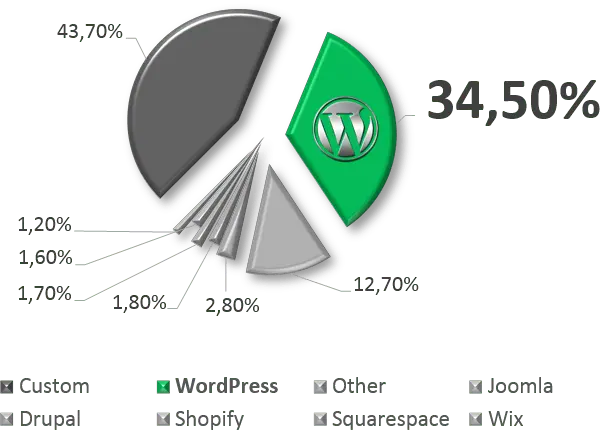
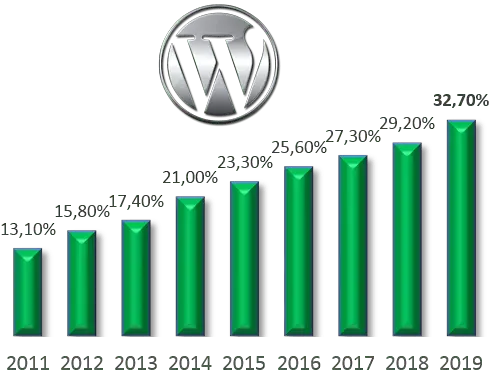
Considered one of these is WordPress to create any web site. It is a very talked-about platform – now more than 34% of the total world number of sites are made on it. Selecting WordPress, you’ll not have to alter it for something for a really very long time – it’s fairly versatile and expandable.
WordPress set up itself takes actually 5 minutes. Don’t forget that there are specialised internet hosting companies preloaded with WordPress CMS and optimized for fast work.
Selecting Deal with and Location
Subsequent, it is advisable determine the place the location will likely be situated and at what deal with it may be discovered. The placement of the location is internet hosting (the server on which the recordsdata of your website will likely be bodily positioned). The positioning deal with is its area title like www.mysite.ru.
To learn more, check our guide on top financial apps for money management.
The positioning deal with is chosen as soon as, and it’s must be chosen responsibly. However, internet hosting will be simply modified at any time as your wants enhance. If you don’t want to do that by your self, it won’t be troublesome to discover a specialist. Furthermore, most internet hosting suppliers will switch your website to themselves and do it fully freed from cost.
Fortunately, WordPress supplies a particular oriented internet hosting named wordpress.com with free and paid plans. Website title will be additionally chosen there. It’s an all-in-one field resolution covers any wants in running a blog and site-building with ultra-high-speed internet hosting.
Making Supplies and Articles
Additional, to fill the location, it is advisable create supplies for it. So, easy methods to make an online web page? The engine itself means that you can edit pages on the location and fill it with content material by way of a particular editor. However there may be an simpler manner – to make site pages right via familiar to all Microsoft Word (or Google Docs or OpenOffice – as anybody is used to).

Specialists created particular free WordPress plugins that means that you can add ready paperwork to the location. It contain all the pieces you want for a stupendous and correct import of completed supplies in WordPress. It allow you to create and format the material within the editor that’s acquainted and handy for you, after which, m/wordpress/post-docx-sourceerely importing the completed DOCX file to the location to get a totally ready web page. Additionally, a converter from DOCX to HTML is available online, the place you possibly can strive it with out putting in something anyplace.
In the event you’ve gotten used to it a bit and wish to do search engine optimization, then these plugins is adapted for these duties too.
The plugins has a number of settings and can mean you can arrange handy work with many authors, in addition to considerably cut back the time spent by editors and search engine optimization specialists when posting supplies on a website working WordPress. Routinely changing and producing alt and title tags, resizing and cropping photographs, adjusting the hierarchy of headers are just some of the options that make life a lot simpler.
Formulation Assist
Of the most recent improvements, it helps and the imports appropriately Phrase formulation in WordPress. The plugins permits, with out losing the time, importing and proper show formulation of any complexity in WordPress. That’s considerably benefit for science groups and specialists in varied fields. The publication of their achievements, the opportunity of easy changes, and on the identical time – the entire absence of the necessity to adapt to some necessities of third-party software program – all the pieces is acquainted, commonplace, and most significantly – easy!
Conclusion
Consequently, we’ve got a ready-made web site and there may be a simple technique to publish nearly any supplies on it. Our job of making an internet site totally free is accomplished! Now you possibly can create an internet site for your enterprise, create your personal web site utilizing acquainted Google or Microsoft instruments.