Table of Contents
- Why MySQL Databases Grow Over Time
- Database Logs and Their Impact
- How Bots Inflate Database Size
- Session Tables and Database Clutter
- Database Cache Storage Problems
- Storing Images Inside Databases
- Too Many Database Tables
- Optimizing Tables Using phpMyAdmin
- Best Practices for Database Optimization
- Frequently Asked Questions
Database performance plays a critical role in website speed, server stability, and overall user experience.
As websites grow, MySQL databases often become significantly larger over time due to logs, sessions, cache files, bots, plugins, and unnecessary stored data.
If database growth is not managed correctly, websites may experience slower loading times, increased server resource usage, and degraded performance.
Fortunately, there are several effective strategies that can help reduce MySQL database size while improving website responsiveness and server efficiency.
In this guide, we explore the most common causes of database growth and explain practical methods for optimizing and cleaning MySQL databases safely.

Why MySQL Databases Grow Over Time
Many websites experience uncontrolled database growth because applications continuously store new information.
Some data is essential for website functionality, while other data becomes outdated, duplicated, or unnecessary over time.
Common Causes of Database Growth
- Activity logs
- Spam bot submissions
- User sessions
- Database caching
- Stored images
- Unused plugins and modules
- Temporary records
Without proper maintenance, these elements can rapidly consume disk space and negatively impact website performance.
Database Logs and Their Impact
Many applications use databases to store logs such as:
- User activity
- Error reports
- Registration attempts
- Email delivery logs
- Administrative actions
- Analytics information
Although logs can be useful for troubleshooting and monitoring, storing excessive log data inside MySQL databases often creates performance issues.
Why Database Logging Can Become a Problem
Busy websites generate massive amounts of log entries every day.
Over time, log tables may become extremely large, increasing query times and disk usage.
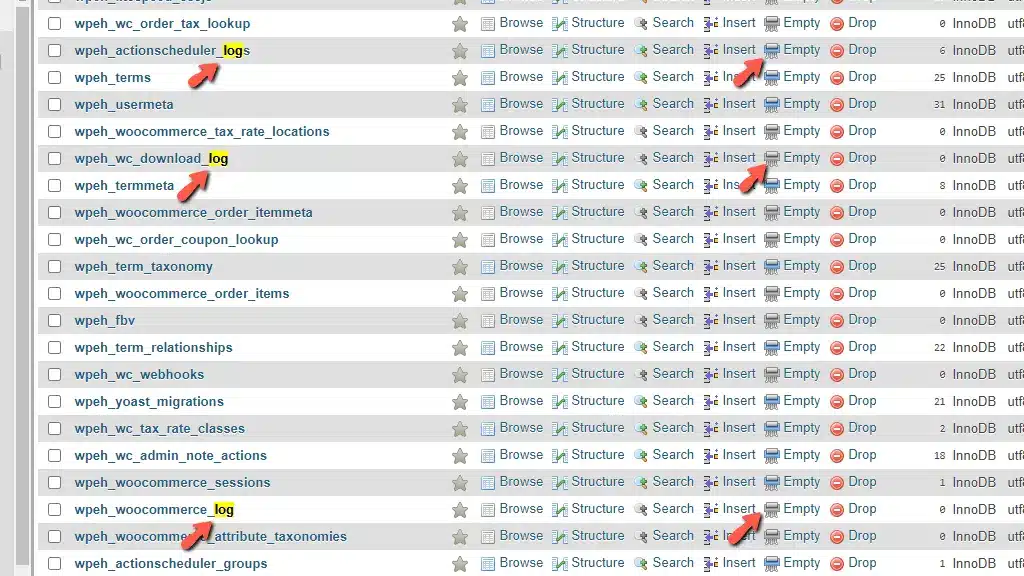
How to Reduce Log Table Size
Most log tables contain terms such as “log” or “analytics” in their names.
Using phpMyAdmin, administrators can:
- Empty tables
- Truncate tables
- Delete unnecessary log records
Many modern applications also allow administrators to switch from database logging to file-based logging, which often improves efficiency.
How Bots Inflate Database Size
Spam bots represent another major cause of uncontrolled database growth.
Bots frequently target:
- Login forms
- Registration pages
- Comment sections
- Contact forms
- User-generated content systems
Each spam interaction may generate unnecessary records stored inside the database.
How to Prevent Bots from Flooding Databases
One of the most effective solutions is implementing CAPTCHA or reCAPTCHA protection on all forms.
Other useful strategies include:
- Email verification systems
- Comment moderation
- User approval workflows
- Rate limiting protections
- Firewall and security plugins
Administrators should also verify whether CAPTCHA systems themselves create unnecessary database logs.
Session Tables and Database Clutter
Many websites store user session data inside MySQL databases.
Sessions help maintain login states and user activity during browsing sessions.
However, poorly configured applications may fail to delete expired sessions properly.
Problems Caused by Old Sessions
- Large unused tables
- Slower queries
- Excessive disk consumption
- Reduced database efficiency
How to Clean Session Tables
Session tables usually contain terms like “session” or “sess.”
Administrators can safely:
- Empty session tables
- Truncate expired sessions
- Move session storage to system files
Many applications allow changing session storage from databases to server-side files through configuration settings.
Database Cache Storage Problems
Some applications use MySQL databases to store cache content.
While database caching is technically functional, file-based caching often provides better scalability and lower database overhead.
Problems with Database Cache Storage
- Large temporary tables
- Frequent database writes
- Increased server load
- Slower database performance
How to Improve Cache Management
Most applications allow administrators to switch from database caching to:
- File caching
- Redis caching
- Memcached
- Server-side object caching
Cache tables often include the word “cache” and can usually be emptied safely using phpMyAdmin.
Storing Images Inside Databases
Older applications sometimes store images directly inside databases using binary large objects (BLOBs).
This outdated practice significantly increases database size and reduces performance.
Why Database Image Storage Is Problematic
- Massive database growth
- Slower backups
- Higher memory usage
- Reduced query performance
Modern best practices recommend storing media files directly on the filesystem or cloud storage services while saving only image paths inside the database.
Can You Delete Image Tables?
Deleting image-related tables without proper migration may break the entire website and remove media content permanently.
In complex cases, developers should carefully migrate images from databases to filesystem storage.
Too Many Database Tables
Some websites accumulate excessive database tables because of:
- Unused plugins
- Abandoned modules
- Improper SQL imports
- Testing environments
- Temporary installations
Every plugin or module may add multiple tables that remain even after the extension is removed.
How to Reduce Unnecessary Tables
- Uninstall unused plugins
- Remove abandoned modules
- Review old development tables
- Verify active application dependencies
Database administrators should always create backups before deleting unknown tables.
Optimizing Tables Using phpMyAdmin
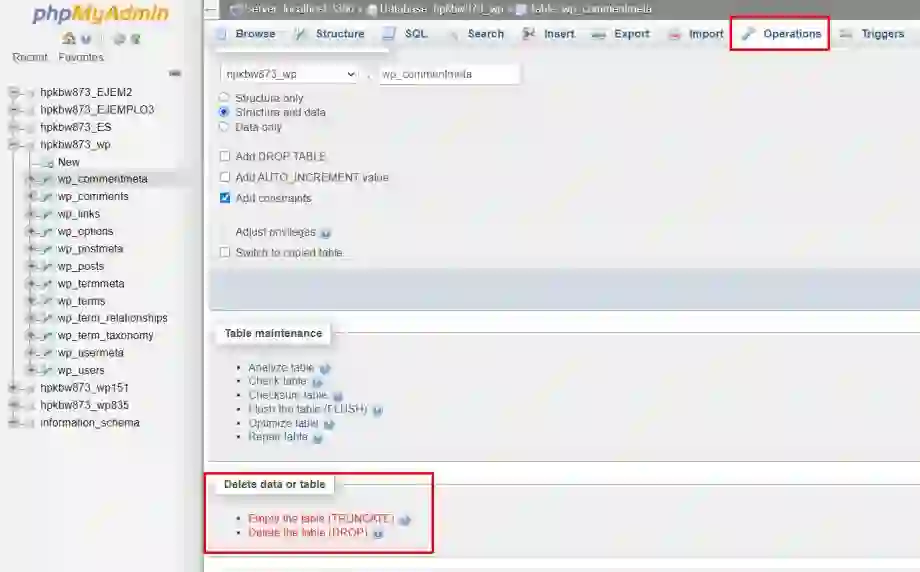
phpMyAdmin provides built-in tools for optimizing MySQL databases.
What Database Optimization Does
Optimization helps:
- Remove temporary data
- Defragment tables
- Improve query efficiency
- Reduce wasted space
- Enhance overall database performance
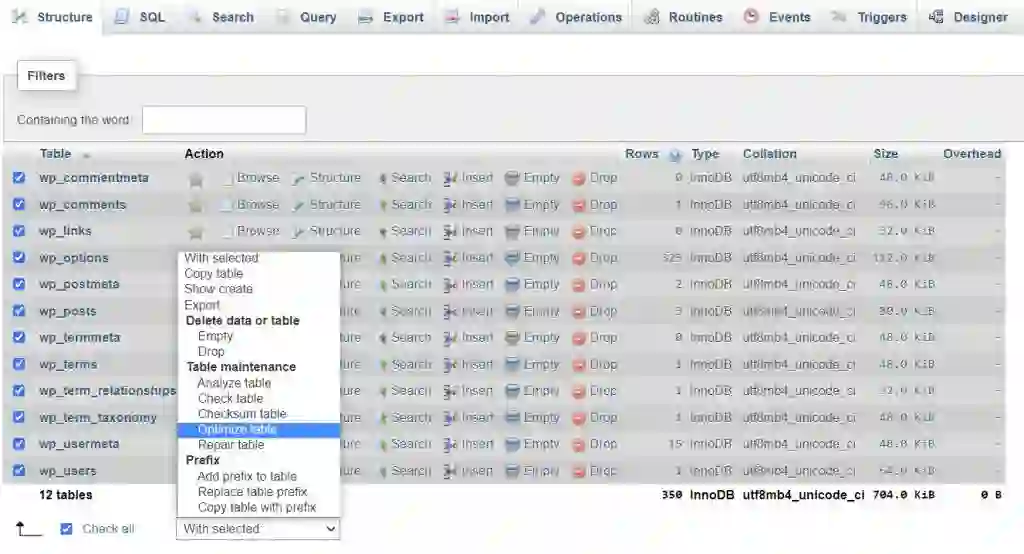
How to Optimize Tables
- Open phpMyAdmin
- Select the database
- Choose target tables
- Click “Optimize Table”
Regular optimization helps maintain database efficiency and prevents unnecessary storage growth.
Best Practices for Database Optimization
Maintaining a healthy MySQL database requires consistent monitoring and preventive maintenance.
Recommended Best Practices
- Schedule regular database cleanups
- Monitor table growth
- Limit excessive logging
- Use file-based caching when possible
- Protect forms against bots
- Remove unused plugins and tables
- Optimize tables periodically
- Create regular backups
These practices help improve website performance, reduce hosting resource usage, and increase long-term server stability.
Final Thoughts
Large and poorly maintained MySQL databases can significantly slow down websites and consume excessive server resources.
By understanding the most common causes of database growth, administrators can implement smarter optimization strategies that improve performance while reducing unnecessary storage usage.
Whether the issue involves logs, bots, sessions, cache tables, images, or unused plugins, regular maintenance and optimization remain essential for healthy website performance.
Using tools like phpMyAdmin alongside proper application configuration can dramatically improve database efficiency and help maintain faster, more reliable websites.
Frequently Asked Questions
Why do MySQL databases become large over time?
Databases grow because of logs, cache files, sessions, spam data, plugins, and temporary records accumulating over time.
Can phpMyAdmin reduce database size?
Yes, phpMyAdmin allows users to optimize, empty, and truncate tables to reduce unnecessary database storage.
Is it safe to delete cache tables?
In most cases, cache tables can be safely emptied because cached data is temporary.
How can I stop bots from filling my database?
Using CAPTCHA systems, moderation tools, and security protections can help prevent spam bots from generating excessive database records.
Should images be stored inside MySQL databases?
Modern best practices recommend storing images on the filesystem or cloud storage instead of inside databases.Database measurement generally is a main slowdown if not managed correctly. On this lesson, we’ll clarify why MySQL databases are likely to develop bigger, learn how to cut back their measurement, and a few useful practices for minimizing MySQL disk utilization! Let’s get began!
Widespread causes for database progress
Imagine it or not, most of the databases on the market share a typical drawback in the case of their progress.
Listed here are the commonest causes you might be more likely to encounter:
Logs
Some functions use databases to file every kind of knowledge, comparable to entry data, errors, varied administrator or consumer actions, registration processes, electronic mail dispatches, and extra. Whereas this data is crucial, storing it in SQL databases is a posh technical choice that requires cautious analysis by the event group, given the character of those databases and their design necessities. This can shortly refill the database, particularly in case your web site is busy, and should result in efficiency points and gradual file logging.
Methods to cease database logging
In the event you discover that the scale of your analytics tables or logs is turning into unmanageable, we suggest switching to file logging. Most fashionable open-source functions retailer logs in recordsdata by default. If this selection is not enabled, your admin management panel ought to present settings to permit logging to recordsdata. In the event you’re utilizing a custom-built web site, it is best to contact the developer to request that they allow file logging.
Methods to cut back database log tables
Earlier than lowering the database measurement, you want to affirm its measurement. Look at your web site’s database. Usually, these tables embody the phrase ” log ” or ” analytics ” of their identify, making them simply distinguishable. To cut back their measurement, merely use ” Empty ” or ” Truncate .” phpMyAdmin supplies this performance, and for extra data on managing MySQL database tables, go to right here!
bots
Apparently, bots are a typical reason for database overgrowth. You might have a database that information virtually all the things that occurs on a web site, comparable to registration, logins, emails, contact kinds, and so on. Now think about a bot programmed to make use of all of those strategies to ship spam to registration and login kinds, thus filling the database tables with faux data that’s imagined to be recorded. In case you have a web site that permits registered customers to create posts and touch upon different customers’ posts, it will get much more weird, because the bot can then begin posting and commenting. And the place do most functions retailer any such knowledge? Sure, that is proper—contained in the database! A spam bot assault can considerably enhance the scale of your database if you happen to do not take sure precautions.
Methods to forestall bots from flooding my database
-
- The simplest means to make use of this methodology is to position the reCaptcha code (https://cloud.google.com/security/products/recaptcha) on all web site kinds. This can be sure that no non-human entity is logged, stopping the buildup of information in your MySQL database.
- Controlling user-level privileges and permitting solely posting choices and creator feedback for customers who cross some verification – electronic mail, for instance.
- Implement moderation for posts, pages, and feedback you could handle your self, or assign another person to do it if in case you have a web site with heavy visitors.
Methods to clear database tables filled with robots
There isn’t any foolproof solution to take away tables populated by bots. These tables embody logs, posts, feedback, reCAPTCHA , and extra. One of the best you are able to do is overview all of the bigger and ” empty ” tables that you just suspect include undesirable content material. In the event you’re not comfy doing this your self, you possibly can rent a developer to overview the complete database and show you how to cut back its measurement by eradicating all undesirable content material.
Periods
All guests to your web site create classes after they use the login kind. To maintain the consumer logged in, the session interacts with a cookie positioned of their browser. Usually, this session lasts for a selected length. Nevertheless, an incorrectly programmed utility may fail to delete the session after it expires or when the consumer logs out. Since your utility shops classes in a database, you may encounter the annoying drawback of the database turning into cluttered with previous classes that customers not use.
Methods to disable classes in a database
Every utility sometimes features a setting in its configuration file that lets you change the situation of session storage from the database to system recordsdata. Please seek the advice of the appliance’s documentation to confirm if this transformation is feasible and learn how to implement it.
Methods to clear database classes
This activity must be very simple. These tables often embody the phrase ” session ” or ” sess ” of their identify, making them simple to differentiate. To cut back their measurement, all you want to do is ” Empty ” or ” Truncate .” phpMyAdmin has this performance inbuilt.
Cache
That is proper. Some functions use their databases to retailer cached content material. This is not a technically dangerous choice in any respect, because it is dependent upon the variety of queries and the cache utilized by the MySQL database, not on the time required to parse the file. In any case, switching from database caching to file caching would positively be a helpful possibility. You will cut back your total database measurement whereas nonetheless having the caching functionality to enhance your web site’s efficiency—a real win-win!
Methods to disable database caching
Usually, every utility has a selected setting in its configuration file that lets you change the cache storage location from the database to the file. Please seek the advice of the appliance’s documentation to see if that is attainable and, in that case, learn how to do it.
Methods to clear cache tables out of your database
This activity must be very simple. Most often, these tables embody the phrase ” cache ” of their identify, making them simple to differentiate. To cut back their measurement, all you want to do is ” Empty ” or ” Truncate .” phpMyAdmin has this performance built-in, and you’ll discover ways to higher handle your MySQL database tables there.
Pictures
There is a very previous methodology for storing photographs in a database. The issue arose as media recordsdata turned more and more bigger and extra seen. Nevertheless, this outdated observe persists amongst builders. In the event you encounter this difficulty, you are in a really tough place, as you possibly can’t merely delete or clear the desk containing the pictures, as a result of that may take away all the pictures out of your web site.
Methods to forestall your app from storing photographs within the database
Usually, every utility has a selected setting in its configuration file that lets you change the picture storage location. Please seek the advice of the appliance’s documentation to see if that is attainable and, in that case, learn how to do it.
Methods to delete your web site’s photographs from the database
Sadly, this isn’t a straightforward activity, as emptying the database will corrupt your content material. We suggest contacting the developer and asking them to utterly overview the appliance and its database, and to vary the way it handles photographs usually.
A really massive variety of database tables
You’ll be able to encounter this drawback in two conditions:
- Both you’ve got by accident imported too many SQL recordsdata right into a single database.
- You might have put in too many plugins/modules in your web site, which has resulted within the addition of many database tables.
Methods to forestall my database tables from rising
First, train excessive warning when importing SQL recordsdata and guarantee they’re imported into the proper database. Second, keep away from putting in modules or plugins from unreliable sources, of doubtful origin, or with poor upkeep.
Methods to cut back the variety of tables in my database
Begin by uninstalling any pointless plugins/modules. Then, rigorously overview your database for any tables your utility is not utilizing. If you will get assist from a licensed internet developer, it should positively make issues simpler.
Optimizing database tables utilizing phpMyAdmin
Earlier than we conclude this tutorial, this is a straightforward activity you possibly can carry out utilizing phpMyAdmin known as “optimization.” This handy operate performs important operations in your database, eradicating pointless data comparable to public and short-term knowledge, finally lowering its measurement. We’ve got an incredible information prepared to make use of on learn how to repair and optimize your database utilizing phpMyAdmin, which we extremely suggest you try!
Ultimate phrases
Cut back the scale of your web site’s database