Table of Contents
- Why WordPress Dominates the Web
- The Importance of High-Quality SEO Content
- Why Microsoft Word Is Better for Content Writing
- Key Benefits of Using Microsoft Word
- Limitations of Standard WordPress Publishing
- Automating Word-to-WordPress Publishing
- Benefits of DOCX Publishing Plugins
- Best Workflow for WordPress Content Teams
- Final Thoughts
- Frequently Asked Questions
WordPress is currently the most popular Content Management System (CMS) in the world. Millions of websites rely on WordPress to manage blogs, online stores, company websites, portfolios, and digital publications.
Its flexibility, scalability, and ease of use make it the preferred platform for businesses and individuals alike. However, managing and publishing high-quality content efficiently remains one of the biggest challenges for website owners and content creators.
Today, successful websites require more than just basic articles. Modern SEO standards demand content that is unique, engaging, optimized for search engines, and professionally structured.
This is why many professional content creators use Microsoft Word as their primary writing tool before publishing content to WordPress.
In this comprehensive guide, you will learn why Microsoft Word remains one of the best tools for content production and how you can automate the process of converting Word documents into WordPress posts efficiently.
Why WordPress Dominates the Web
WordPress powers a significant percentage of websites on the internet today. From personal blogs to enterprise-level business platforms, WordPress provides users with complete control over their digital content.
The platform offers thousands of themes, plugins, and customization options that allow website owners to create virtually any type of website.
To learn more, check our guide on how to free Uurage space on your smartphone.
Main Reasons for WordPress Popularity
- User-friendly dashboard
- SEO-friendly architecture
- Large plugin ecosystem
- Customizable themes
- Excellent scalability
- Strong community support
Despite its powerful built-in editor, many professional publishers still prefer preparing content externally using advanced word-processing software.
The Importance of High-Quality SEO Content
Search engines have evolved dramatically over the years. In the past, websites could rank using backlinks and keyword stuffing alone. Today, search engines prioritize valuable and user-focused content.
To rank effectively in Google search results, content must meet several important criteria:
1. Unique Content
Duplicate content can negatively affect search engine rankings. Unique articles improve website credibility and increase visibility.
2. High Quality
Grammar, formatting, readability, structure, and visual organization all influence content quality.
3. User Engagement
Interesting content keeps visitors on the page longer. Search engines interpret longer engagement as a positive ranking signal.
4. Keyword Optimization
Strategic keyword placement remains essential for SEO success. However, modern optimization must appear natural and user-friendly.
To learn more, check our guide on Best Camera Phones in 2025.
Creating this level of content consistently requires powerful writing and editing tools.
Why Microsoft Word Is Better for Content Writing
Although WordPress includes a built-in editor, Microsoft Word remains one of the best tools for professional content creation.
Microsoft Word provides advanced writing features, offline access, collaboration tools, and better content organization compared to standard browser editors.
Many professional bloggers, marketers, and editorial teams draft their articles in Word before publishing them online.
Key Benefits of Using Microsoft Word
1. Advanced Editing and Formatting
Microsoft Word offers powerful formatting tools that improve readability and organization.
You can easily structure headings, add bullet points, create tables, highlight keywords, and maintain consistent formatting throughout the article.
2. Spell Check and Grammar Correction
Word includes advanced grammar and spelling tools that help eliminate writing errors before publication.
This improves content quality and professionalism significantly.
3. Keyword Highlighting and SEO Planning
Color tagging and highlighting make it easier to track SEO keywords and semantic phrases during writing.
This helps maintain keyword balance without over-optimization.
To learn more, check our guide on generative AI for gontent greation.
4. Offline Editing
One of the biggest advantages of Microsoft Word is offline accessibility.
You can write and edit articles without internet access, reducing the risk of data loss caused by browser crashes or hosting issues.
5. Collaboration and Review Features
Word allows multiple users to collaborate through platforms such as Google Drive and OneDrive.
Editors can leave comments, track changes, and review updates efficiently.
6. Version Control
Saving documents in cloud storage provides reliable version management and backup protection.
This prevents accidental loss of important content revisions.
Limitations of Standard WordPress Publishing
Although WordPress supports copy-and-paste functionality from Microsoft Word, the process is not always perfect.
Common issues include:
- Broken formatting
- Missing images
- Incorrect hyperlinks
- Lost metadata
- SEO markup issues
- Manual category assignment
Publishing content manually can also consume valuable time, especially for websites managing large amounts of content regularly.
Automating Word-to-WordPress Publishing
Modern publishing workflows increasingly rely on automation tools that convert Word documents directly into WordPress posts.
Specialized plugins can automatically import DOCX files while preserving formatting, media files, metadata, and SEO structures.
This automation dramatically improves productivity for bloggers, agencies, and editorial teams.
To learn more, check our guide on NVIDIA Artificial Intelligence.
Features of Automated Publishing Plugins
- Automatic DOCX conversion
- Image importing and optimization
- SEO-friendly formatting
- Category and tag management
- URL correction
- Internal link preservation
- Bulk document publishing
These tools reduce manual editing and streamline the entire publishing workflow.

Benefits of DOCX Publishing Plugins
Improved Productivity
Automation eliminates repetitive tasks and allows content teams to publish articles faster.
Better SEO Optimization
Proper formatting preservation helps maintain SEO structures and readability.
Enhanced Collaboration
Writers and editors can continue using familiar tools like Microsoft Word while developers manage WordPress independently.
Reduced Errors
Automated conversion reduces formatting inconsistencies and publishing mistakes.
Best Workflow for WordPress Content Teams
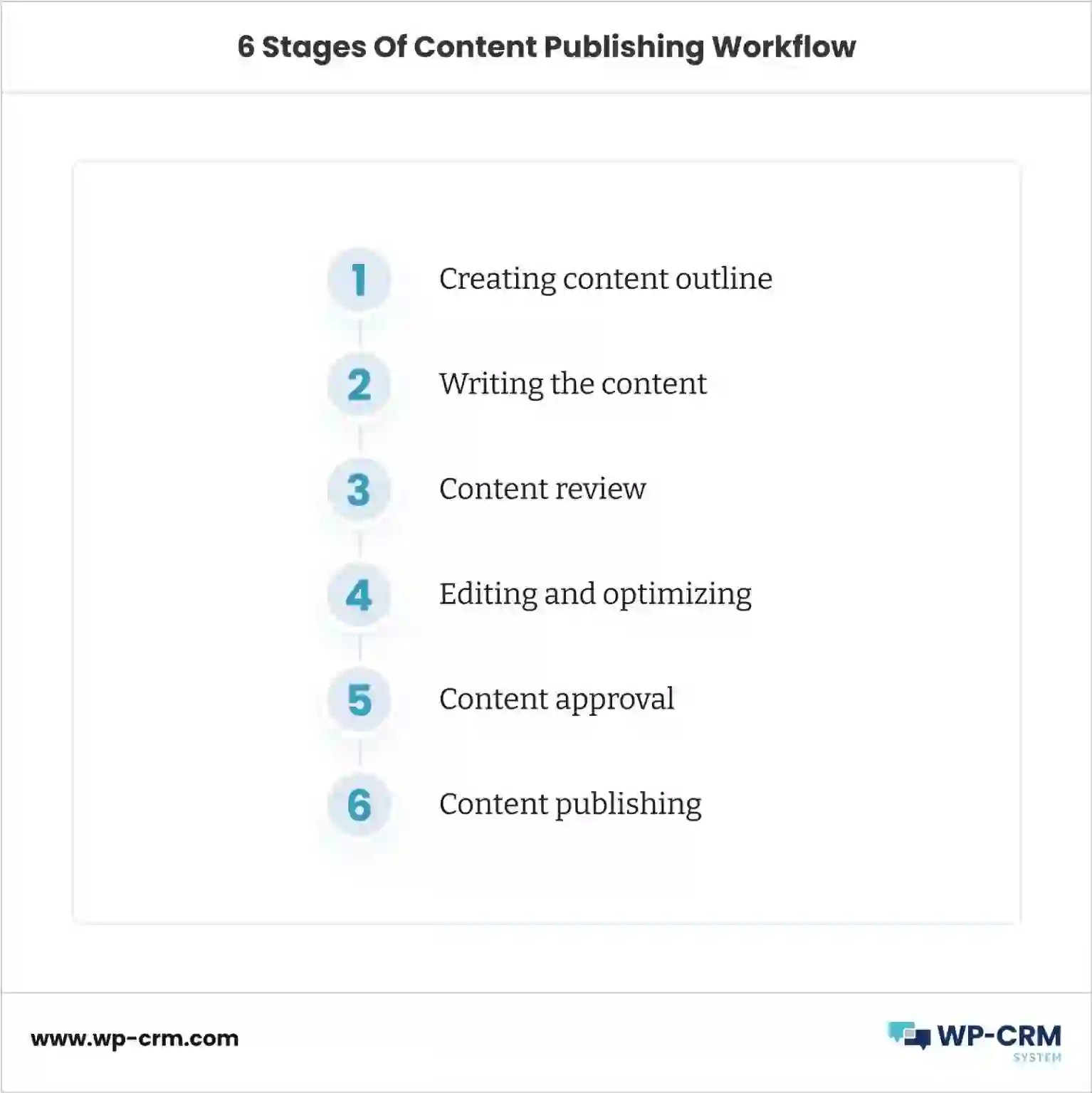
Professional publishing teams often follow this workflow:
- Create content in Microsoft Word
- Optimize SEO keywords
- Review grammar and formatting
- Collaborate with editors
- Store documents in cloud platforms
- Import documents automatically into WordPress
- Publish optimized articles
This workflow combines the strengths of Microsoft Word with the publishing flexibility of WordPress.
To learn more, check our guide on how to connect Xbox to the internet.
Final Thoughts
Content quality plays a major role in modern SEO success. While WordPress is one of the best publishing platforms available, Microsoft Word remains an incredibly powerful content creation tool.
Combining Microsoft Word with automated WordPress publishing solutions can significantly improve productivity, collaboration, and content quality.
By using advanced document management workflows and automation plugins, website owners can streamline publishing processes while maintaining professional SEO standards.
If you regularly create large amounts of content for WordPress websites, implementing a Word-to-WordPress workflow can save time, reduce errors, and improve overall publishing efficiency.

Frequently Asked Questions
Can Microsoft Word documents be imported directly into WordPress?
Yes, several plugins allow DOCX files to be imported directly into WordPress while preserving formatting and images.
Is Microsoft Word better than the WordPress editor?
For advanced writing, collaboration, and offline editing, Microsoft Word offers more powerful features than the standard WordPress editor.
Do Word-to-WordPress plugins support SEO formatting?
Many advanced plugins preserve headings, images, metadata, and SEO structures during conversion.
Can automated publishing improve productivity?
Yes, automation significantly reduces manual formatting and publishing tasks.
To learn more, check our guide on google AI overviews Ads.
What is the best workflow for content teams?
Writing in Microsoft Word, reviewing collaboratively, and publishing automatically to WordPress is one of the most efficient workflows.
WordPress is the most well-liked Content material Administration System on this planet. This straightforward but strong CMS is used to prepare a lot of the world extensive internet at present together with private blogs, on-line retailers and firm model websites and so forth.
Presently, we must always create excessive engaging website content material to correspond fashionable requirements for search engine marketing (Search Engine Optimization) promotion. It must be distinctive, high quality, fascinating and optimized for the search key phrases. Time has gone once we solely used and paid for exterior hyperlinks and ads.
- Distinctive is required to stop blocks from the major search engines.
- High quality (grammar, theme, design, construction and and so forth.) is measured as by individuals as by the major search engines.
- Curiosity instantly influences on the size of human go to time. Search engines like google and yahoo interpret this time as content material profitability.
- Explicit key phrases optimization additionally is required to remain in high 10 within the search outcomes. It’s not attainable to be on such place with out it as a substitute of realizing all above factors.

An important and helpful factor on our website is a content material. We will write it by ourselves or order it from different corporations.
Why Microsoft Phrase
We will sort texts in WordPress editor however it’s higher to make use of commonplace instrument MS Phrase. It’s one of many world requirements of paperwork together with PDF.

Benefits
-
Feedback and highlights
The colour tagging of key phrases lets you see the semantic core in motion, and the feedback are very helpful when reviewing by different individuals and don’t overlook one thing sooner or later.
-
Phrase and key phrase counting
We should always rely it to realize greatest leads to search output.
-
Independence from community
We will edit publish anyplace at any time. We get independence from browser freeze, community troubles, internet hosting harms and undesirable signout that may result in information loss.
-
Sharing and overview
We will share our paperwork with others trough Sky Drive®, Google Drive® or just like make corrections and overview. MS Phrase has helpful overview and distinction comparability capacity.
-
Spell correction and different instruments
There are spell and grammar correction on board. And there are big quantity extensions that present prolonged performance embody helpful macros. Our CMS has quite a lot of completely different plugins too however it might enhance the load on the system.
-
Model management
We will put paperwork into any versioning repository (embody clouds e.g. Sky Drive®) to avoid wasting our work. WP additionally has model management, however it leads WP degradation after it obtained an enormous quantity of publish variations.
To learn more, check our guide on top financial apps for money management.
Computerized conversion from Phrase to WordPress
Why commonplace publish methods aren’t sufficient:
- We’ve to make manually some correction like take away nonexistent hyperlinks and serving to markups, set classes, title and different publish attributes.
- WordPress supports simple copy\paste from MS Word however generally it might lose some elements of the doc.
- MS Phrase additionally helps solely basic publishing to WordPress and e.g. we don’t have the choice to skip search engine marketing markups.
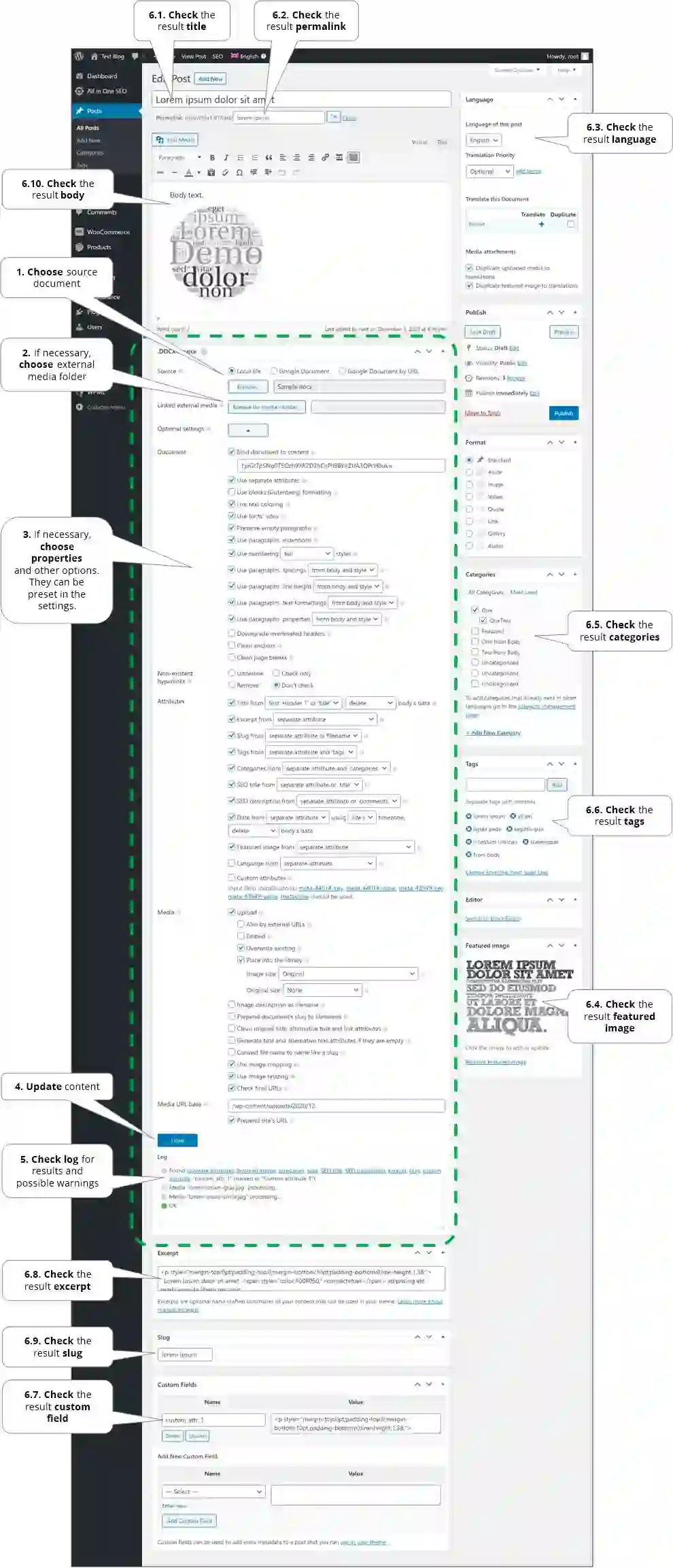
We’ve developed particular free plugin named Publish .DOCX Supply that takes care of automated conversion from MS Phrase to WordPress publish, web page or product. It checks and corrects hyperlinks to different paperwork, units all attributes, corrects media and different pages URL’s to website format and appropriate with hottest plugins. Listing of all options is obtainable in above hyperlink.
See the documentation methods to use all plugin options.
Conclusion
Finally, we have now developed WordPress doc administration system strategy that features a highly effective strategy to retailer, edit and automated publish our content material to website. Particularly, there may be capacity to publish to WordPress a set of paperwork in a single click on.