Table of Contents
- Why Image Optimization Matters
- What Is Imagify?
- Benefits of Optimizing Website Images
- Choosing the Right Image Format
- How to Install Imagify in WordPress
- Best Imagify Settings for Performance
- Bulk Optimize Existing Images
- Additional Image Optimization Best Practices
- Testing Performance With GTmetrix
- Frequently Asked Questions
Images are one of the most important elements of modern websites, but they are also one of the biggest causes of slow loading speeds.
According to modern web performance studies, over 99% of websites use images extensively, making image optimization essential for improving:
- Website speed
- SEO rankings
- User experience
- Core Web Vitals
- Mobile performance
Large unoptimized images increase bandwidth usage, slow down page rendering, and negatively impact search engine performance.
Fortunately, WordPress users can automate most optimization tasks using plugins such as :contentReference[oaicite:2]{index=2}. :contentReference[oaicite:3]{index=3}
This guide explains how to optimize WordPress images using Imagify, configure the best settings, and improve your website’s loading speed without technical expertise.

Why Image Optimization Matters
Images are typically the heaviest assets on a webpage.
When photos are uploaded at unnecessarily high resolutions or without compression, they dramatically increase page size.
Problems Caused by Unoptimized Images
- Slow page loading times
- Poor mobile performance
- Higher bounce rates
- Reduced SEO visibility
- Increased bandwidth usage
- Poor Core Web Vitals scores
Optimized images load faster while maintaining nearly identical visual quality. :contentReference[oaicite:4]{index=4}
This creates a better experience for visitors and improves website performance metrics that search engines evaluate.
What Is Imagify?
:contentReference[oaicite:5]{index=5} is a WordPress plugin designed to automate image optimization.
The plugin simplifies compression, resizing, and conversion to modern image formats such as WebP and AVIF. :contentReference[oaicite:6]{index=6}
Main Features of Imagify
- Automatic image compression
- Bulk optimization of existing images
- WebP conversion
- AVIF support
- Automatic image resizing
- Original image backups
Imagify works both as a WordPress plugin and an online optimization service.
Benefits of Optimizing Website Images
Optimizing images provides measurable improvements in both performance and SEO.
Main Advantages
- Faster page loading
- Lower server bandwidth usage
- Improved mobile performance
- Better user engagement
- Higher Google search visibility
- Improved Core Web Vitals
Optimized images also reduce the amount of data downloaded by visitors, which is especially important for mobile users on slower connections.
Choosing the Right Image Format
One of the most important parts of image optimization is selecting the proper file format.
Recommended Image Formats
- JPEG → Best for photographs
- PNG → Best for transparent graphics
- SVG → Best for logos and icons
- WebP → Modern high-performance format
- AVIF → Next-generation ultra-efficient format
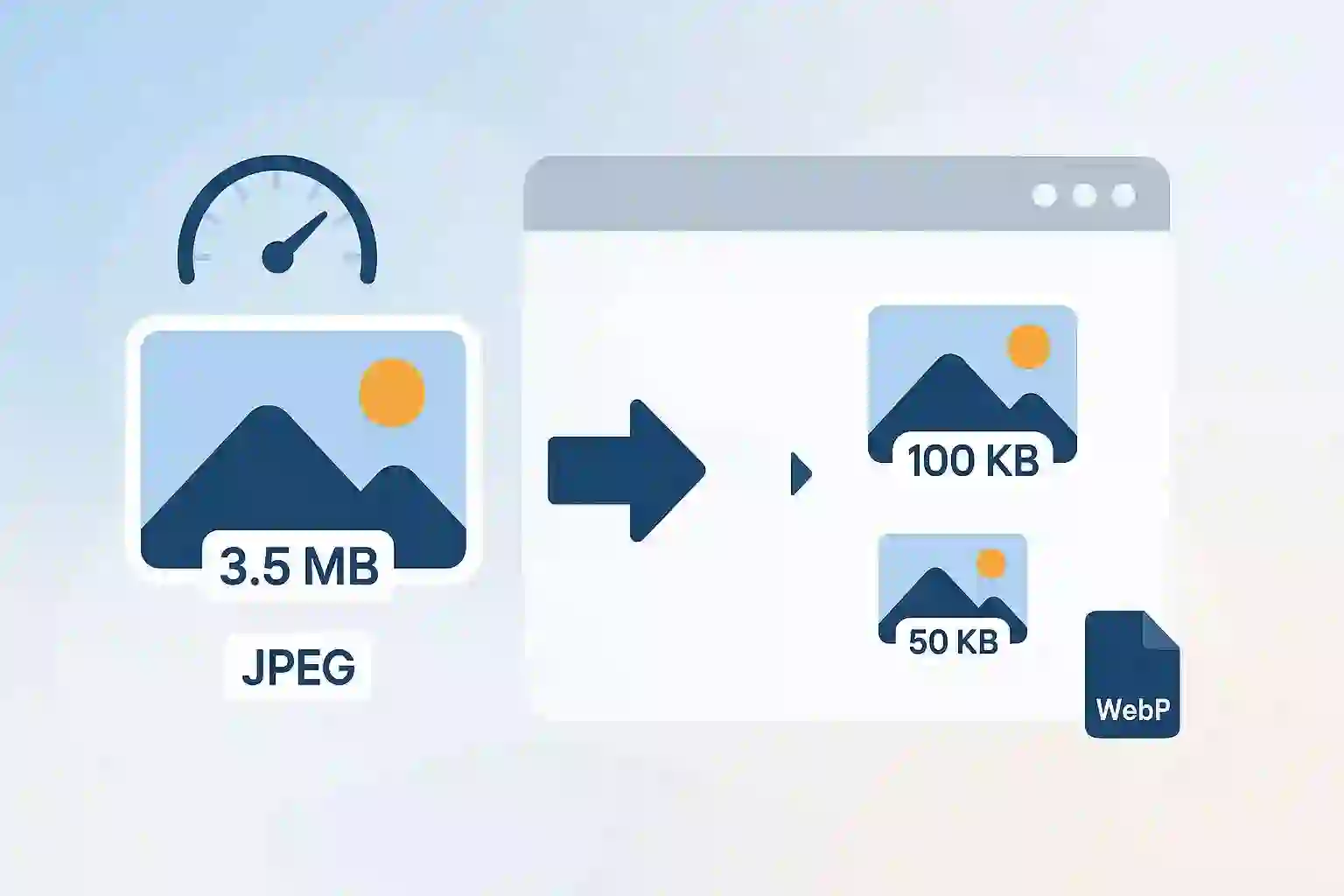
Modern formats such as WebP and AVIF deliver significantly smaller file sizes while maintaining excellent visual quality. :contentReference[oaicite:7]{index=7}
How to Install Imagify in WordPress
Installing Imagify is very simple.
Step 1: Install the Plugin
- Open your WordPress dashboard
- Go to Plugins → Add New
- Search for “Imagify”
- Click Install Now
- Activate the plugin
After activation, the Imagify menu will appear in the WordPress admin sidebar. :contentReference[oaicite:8]{index=8}
Step 2: Create an API Key
You will need a free Imagify account to obtain an API key.
The free plan includes:
- 20MB monthly optimization quota
- Basic image compression
- Automatic optimization support
Premium plans are available for larger websites.
Best Imagify Settings for Performance
Proper plugin configuration is essential for achieving the best balance between image quality and website speed.
Recommended Imagify Settings
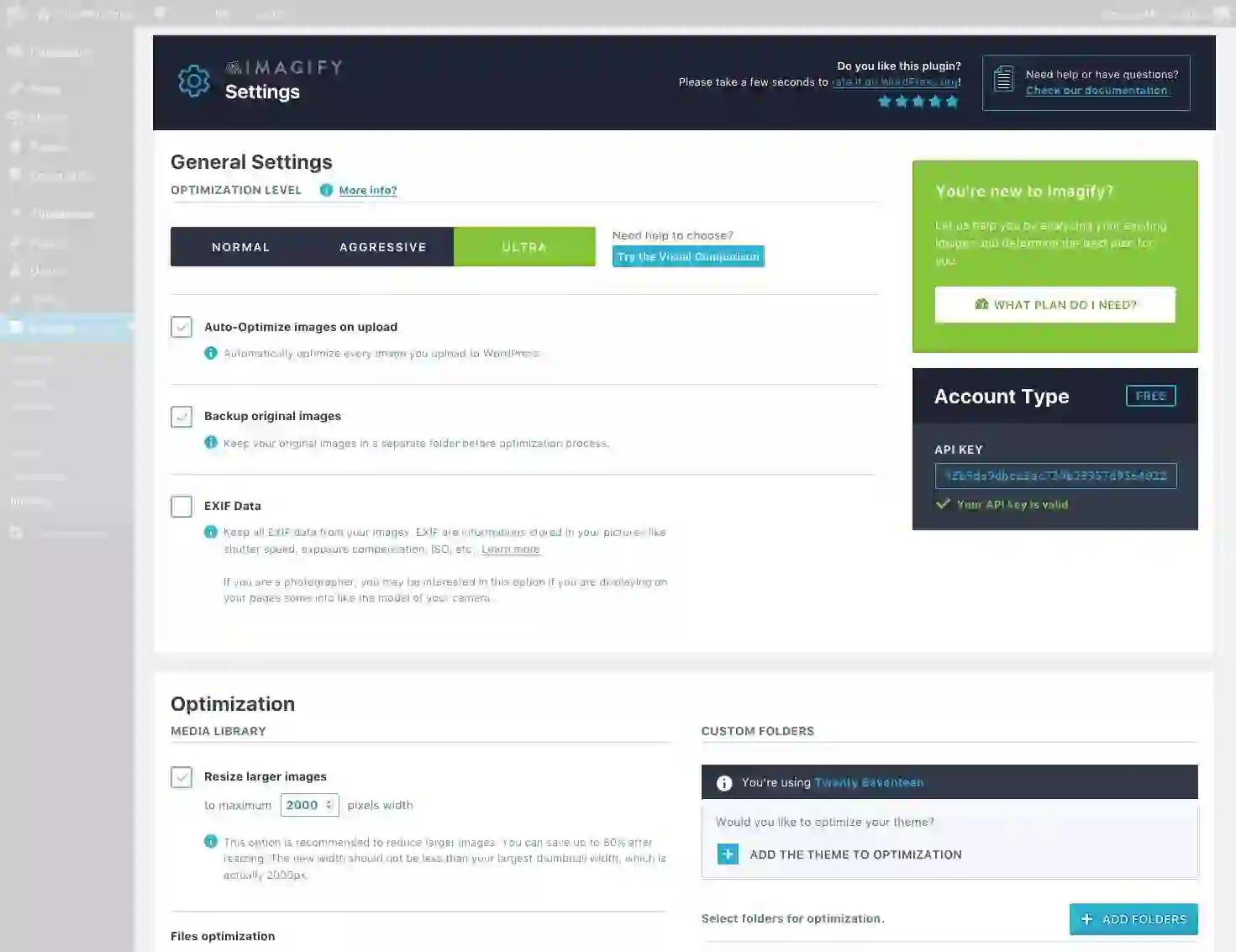
- Enable Auto-Optimize Images on Upload
- Enable Backup Original Images
- Use Smart Compression
- Enable WebP or AVIF conversion
Smart Compression provides the best balance between file size reduction and visual quality. :contentReference[oaicite:9]{index=9}
Lossless compression can preserve maximum quality, but it typically produces larger image files.
Bulk Optimize Existing Images
Imagify allows you to optimize your existing WordPress Media Library automatically.
How Bulk Optimization Works
- Open Imagify Settings
- Go to Bulk Optimizer
- Click “Imagif’em all”
- The optimization process runs in the background
After completion, Imagify displays detailed statistics showing:
- Total file size reduction
- Compression percentages
- Storage savings
Some users report image reductions exceeding 80% while maintaining nearly identical visual quality. :contentReference[oaicite:10]{index=10}
Additional Image Optimization Best Practices
Even with automation tools like Imagify, following proper optimization practices can improve results further.
Resize Images Before Uploading
Uploading oversized images forces browsers to resize them dynamically, wasting bandwidth and processing power.
Always resize images to the maximum dimensions needed for your design before uploading.
Avoid Maximum Camera Resolution
Modern DSLR and smartphone photos are often much larger than necessary for websites.
Reduce resolution and compression levels before uploading to WordPress.
Use Proper Compression Levels
Most websites achieve excellent visual quality using compression levels around 70–80%.
Testing Performance With GTmetrix
Before and after optimization, it is highly recommended to benchmark your website using :contentReference[oaicite:11]{index=11}. :contentReference[oaicite:12]{index=12}
Why GTmetrix Is Useful
- Measures page loading speed
- Analyzes Core Web Vitals
- Identifies oversized images
- Tracks optimization improvements
- Monitors long-term performance
Many image-related performance warnings disappear after proper optimization using Imagify.
Final Thoughts
Image optimization is one of the easiest and most effective ways to improve WordPress website performance.
:contentReference[oaicite:13]{index=13} simplifies the entire process by automating:
- Compression
- Resizing
- WebP conversion
- AVIF generation
- Bulk optimization
By combining Imagify with proper image sizing and modern formats, website owners can dramatically improve loading speeds, user experience, and SEO performance.
Fast-loading websites not only rank better in search engines but also create a more professional experience for visitors across all devices.
Frequently Asked Questions
What is Imagify?
Imagify is a WordPress plugin that automatically compresses and optimizes website images for faster loading speeds.
Does Imagify support WebP?
Yes, Imagify supports WebP image conversion for improved website performance.
What is the difference between WebP and AVIF?
AVIF generally provides better compression than WebP, while WebP has broader browser compatibility.
Can Imagify optimize old images?
Yes, Imagify includes a bulk optimization tool for existing Media Library images.
Why is image optimization important for SEO?
Optimized images improve page speed, user experience, and Core Web Vitals, all of which influence search rankings.
We present you use Imagify – a WordPress plugin designed to make picture optimization easy.
Key Takeaways
- Optimizing photos improves web page velocity, search engine optimization, and person expertise by lowering file dimension and cargo occasions with minimal visible high quality loss.
- Use the WordPress plugin Imagify to automate picture compression, resizing, and next-gen format conversion (WebP/AVIF) for improved web site efficiency.
- Subsequent-gen codecs like WebP and AVIF ship smaller, faster-loading photos whereas retaining visible high quality.
- Further finest practices for picture optimization embody:
- Don’t add photos at max decision – scale back file sizes with lossy or lossless compression
- Resize photos earlier than importing to keep away from browser resizing.
- Use JPEG for images, PNG for clear photos, SVG for logos.
- Benchmark earlier than/after outcomes with GTmetrix testing, and monitor ongoing efficiency.
Overview
Photographs are ubiquitous on the web, with over 99% of websites using at least one image, based on the HTTP Archive.
They’re typically the heaviest media/file kind on the web page, making them a key goal for bettering your web site’s efficiency.
For WordPress customers, picture optimization doesn’t need to be technical or time-consuming because of the availability of many plugins that compress, resize, and serve your photos in new gen codecs to cut back file dimension and enhance web page load occasions.

On this information, we’ll present you use Imagify to simply optimize your photos without having developer help.
Why Does Picture Optimization Matter?
In a nutshell, optimized photos are lighter and devour much less bandwidth in order that they load quicker and enhance your guests’ web page expertise.
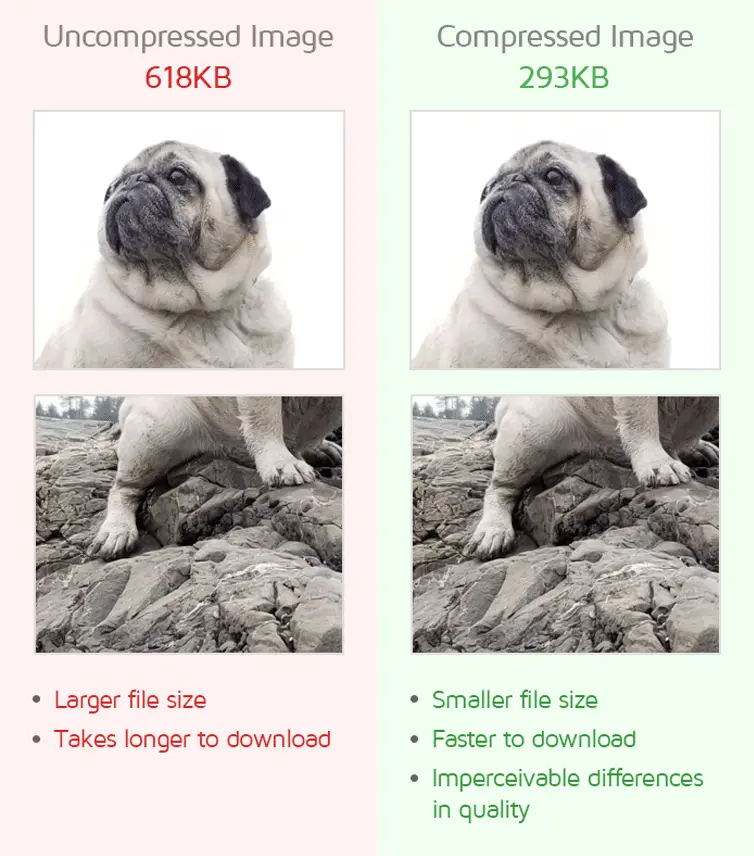 Within the above instance, picture compression decreased the dimensions of the picture by greater than half, with imperceivable variations in high quality.
Picture optimization principally boils all the way down to:
- Selecting the best format on your photos::
-
- Select JPEG for images, PNG for clear graphics, SVG for logos or icons.
- The place attainable, use new gen codecs like AVIF, WebP for many photos.
-
- Correctly sizing your photos:
-
- Export your photos on the proper high quality (usually round 70-80%) and dimension them appropriately for the target market to keep away from forcing the browser to resize them.
-
- Effectively encoding your photos:
- Compress your photos (with out noticeably degrading picture high quality) to cut back your picture file sizes and loading occasions.
Take into consideration the kind of photos you usually see/use on web sites nowadays. They might be:
- Excessive decision images taken on DSLRs
- Top quality logos or infographics
- Animated GIFs
- AI-generated cartoons
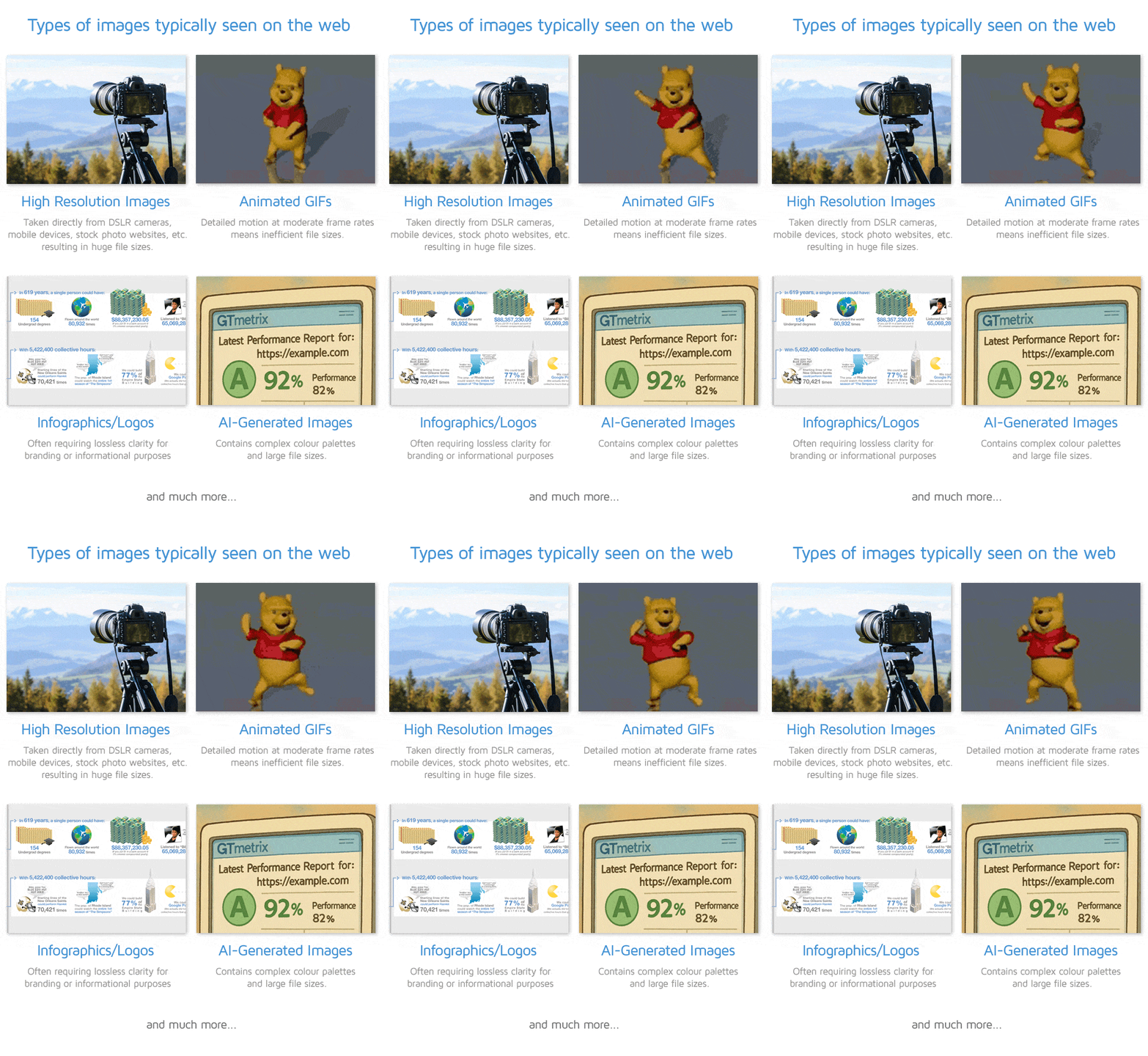
Unoptimized photos are a significant contributor to web page bloat – growing load occasions, and straining each server assets and person bandwidth. This could in the end result in larger bounce charges, decrease conversion charges, and frustrate customers.
Optimizing your photos can have the alternative impact, resulting in larger site visitors, higher engagement/conversions, and elevated visibility on Google search, all of which implies extra income, making it a simple win for you.
What Does Imagify Do?
Imagify is a picture optimization WordPress plugin that can be supplied as an online service. It does the next:
-
- Robotically compresses photos on add to cut back file sizes for quicker web page masses. Two compression modes are supplied:
-
- Sensible compression: Balances optimum file dimension discount with picture high quality (mechanically enabled by default).
- Lossless compression: Reduces file dimension with none seen high quality loss.
-
- Robotically converts uploaded photos to new-gen picture codecs like WebP and AVIF, which might velocity up loading occasions.
- Robotically compresses photos on add to cut back file sizes for quicker web page masses. Two compression modes are supplied:
-
- Performs bulk optimization of present photos within the WordPress media library, and works within the background — no handbook effort wanted.
-
- Robotically resizes photos to a specified most width throughout optimization to take care of optimum show throughout gadgets.
- Shops authentic photos as a way to restore if wanted.
In abstract, Imagify applies all the most important picture optimization best-practices with just some clicks.
This consists of the aforementioned picture optimization strategies and with an easy-to-use interface, the plugin is accessible to customers with out technical experience.
Learn how to Get Began With Imagify
Earlier than getting began with Imagify, we’d recommend testing your web page with GTmetrix first to determine baseline efficiency. This can even make it simpler (and helpful) to check your web page’s outcomes earlier than and after optimization.
1) Set up and Activate the free Imagify plugin straight out of your WordPress admin
The process to do that is similar as some other plugin. Seek for Imagify within the “Add New Plugin” menu and click on on Set up Now.
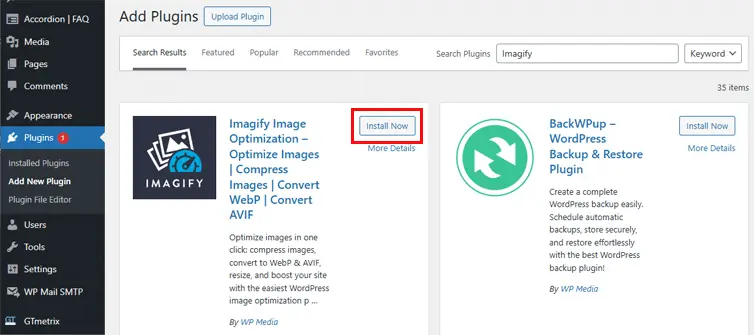
When you’ve put in the plugin, click on on Activate and it is best to then see “Imagify” in your plugins menu.
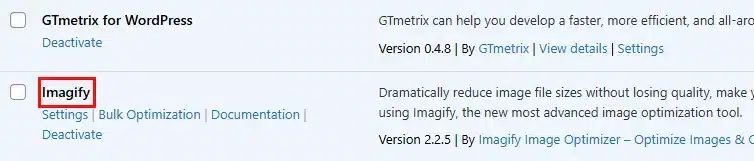 As soon as activated, it is best to see the Imagify menu choice in your sidebar.
Now, click on on “Settings”.
2) Create an account to get your API keyYou may join straight from the plugin settings by clicking on Create a Free API Key.
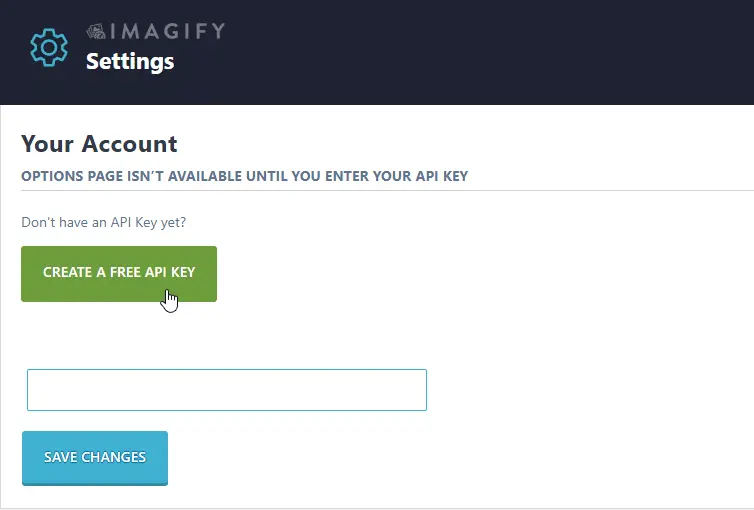
Free plans include 20 MB of picture optimization monthly, which is okay for small web sites.
Premium plans can be found you probably have larger utilization wants.
3) Configure the plugin settings as follows
-
- Allow Auto-Optimize photos on add
-
- Allow Backup authentic photos are enabled
- Depart Lossless compression disabled by default
-
- This can make sure the plugin makes use of the Sensible compression choice to search out an optimum steadiness of file dimension and picture high quality.
- Should you completely must have very prime quality photos, then you’ll be able to allow this selection however word that efficiency will degrade.
-
- Choose both WebP or AVIF format on your photos
- WebP gives close to common compatibility whereas AVIF typically produces superior compression.
- Learn our information on utilizing the appropriate picture codecs to study extra on which format could also be extra appropriate for you.
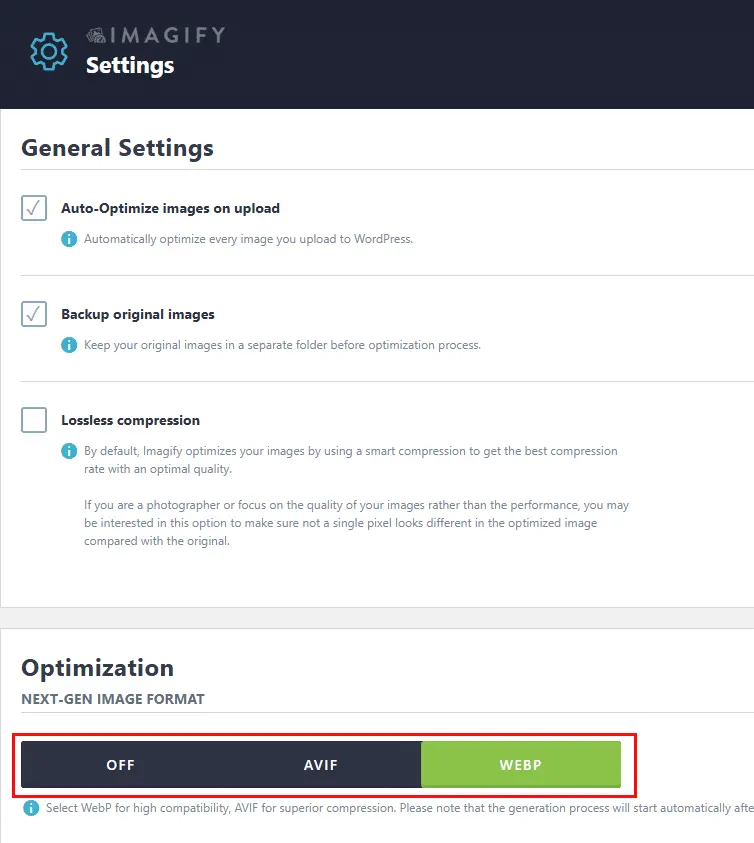 Configure the Imagify settings for Sensible compression and choose one of many trendy picture codecs for even larger picture file financial savings.
When you’re carried out configuring all of the settings, click on on Save & Go to Bulk Optimizer.
4) Bulk Optimize your Library photos
Click on on Imagif’em all to compress your photos.
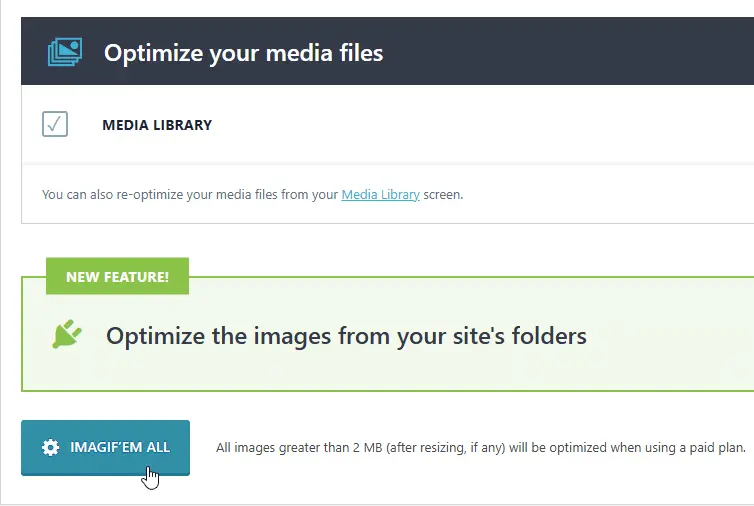 Click on on “Imagif’em all” to bulk optimize all of your photos.
You don’t must hold the web page open as Imagify async bulk optimization course of works within the background.
You may at all times return to the Bulk Optimizer Dashboard by hovering over Imagify within the Admin Bar (on the high of your admin web page) and clicking on Bulk Optimization.
Alternatively, you’ll be able to click on on Bulk Optimization beneath the Media menu.
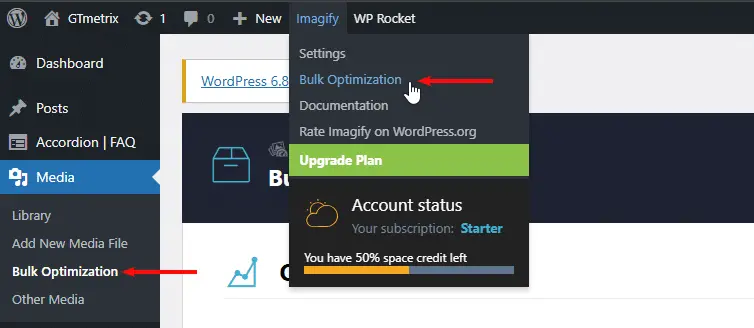 Click on on “Bulk Optimization” to open the Bulk Optimization Dashboard.
As soon as the majority optimization is completed, you’ll be able to view the compression statistics highlighting the general file dimension financial savings achieved by Imagify.
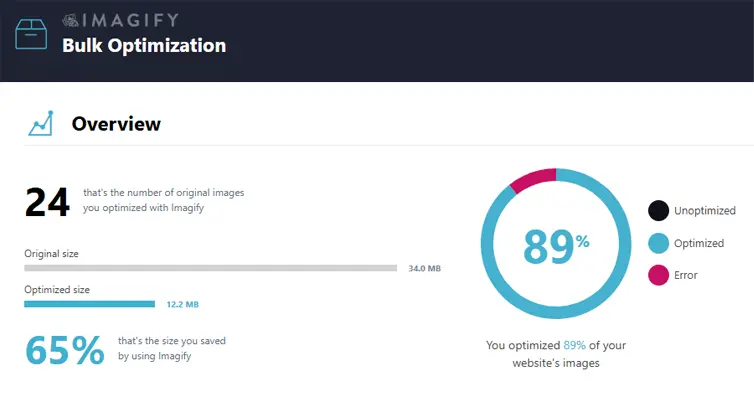 Open the Bulk Optimization web page to see the whole file dimension financial savings achieved by Imagify on your Media Library.
You can too go to your Media Library and see how a lot you’ve gotten saved on every particular person picture.
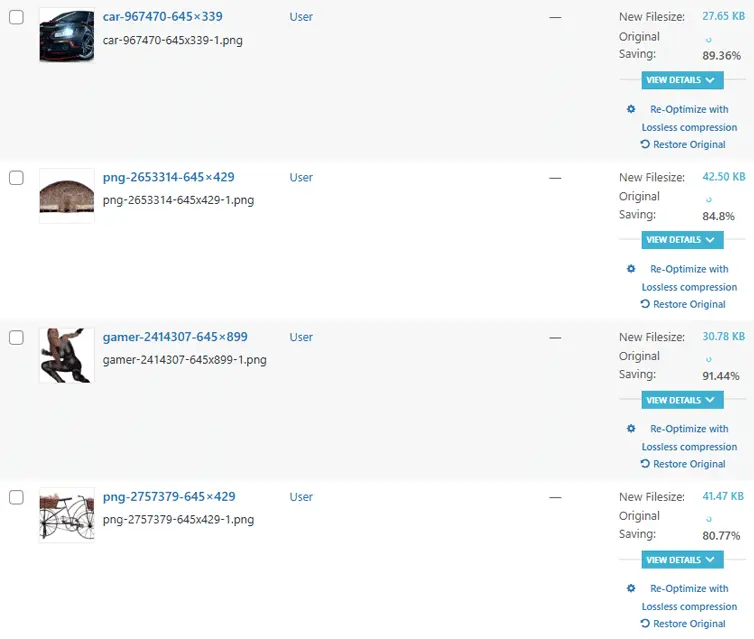 Go to your Media Library to see how a lot you’ve saved on every picture.
Word that each new picture you add to the Media Library will mechanically be optimized as per your configured settings.
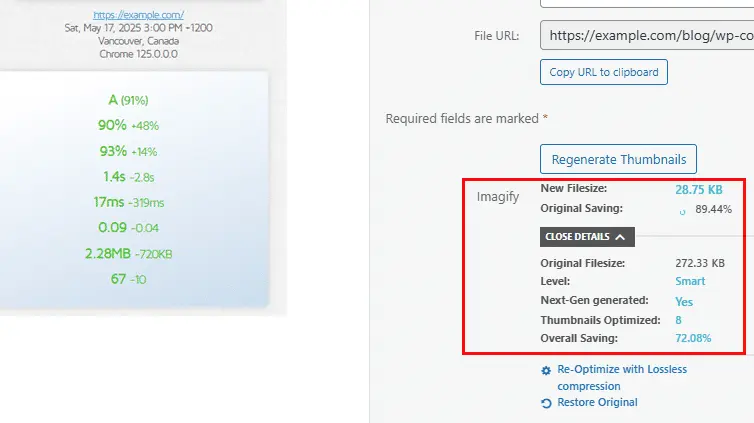 When enabled, Imagify mechanically optimizes each new add. On this instance, Imagify decreased this picture’s file dimension by 89.44%.
Whereas Imagify is a strong plugin that may considerably scale back your picture sizes and serve them in next-gen codecs, we’d recommend following some picture optimization finest practices for even higher outcomes.
Correctly Measurement Your Photographs
Even earlier than you add your photos to your Media library, be certain that they’re correctly sized on your meant viewers.
Should you add photos which are too massive, then your guests’ browsers will at all times need to unnecessarily resize the picture to suit their respective viewports.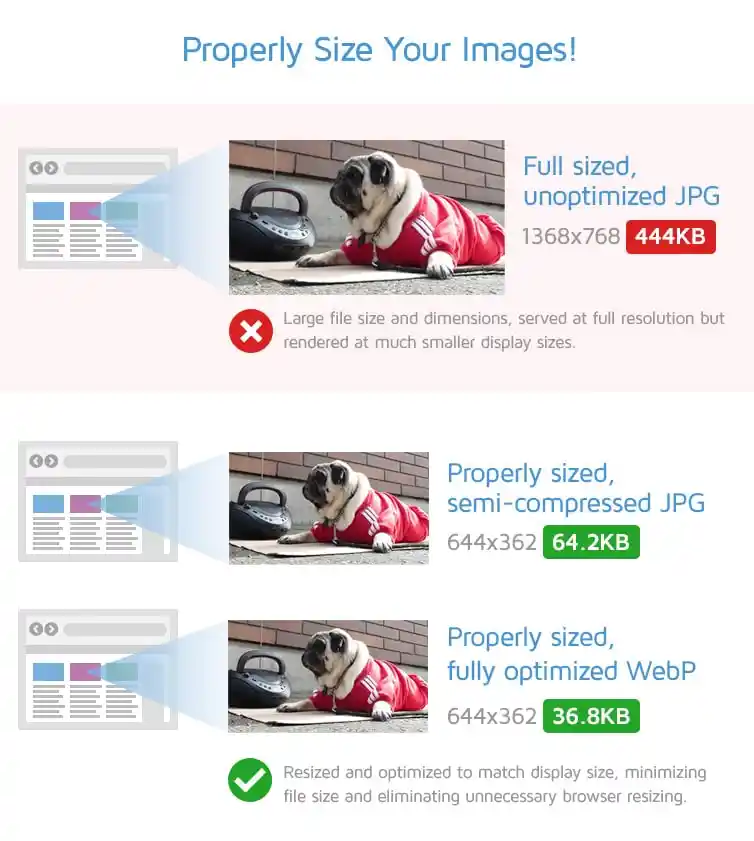
When you can resize your photos utilizing Imagify, it’s a good observe to include this behavior into your design and picture creation workflow anyway.
Use the Proper Format
Understand that as soon as Imagify is activated (and also you’ve configured it appropriately), Imagify will serve your photos within the chosen next-gen format.
Earlier than you add the photographs to your library nonetheless, we’d recommend selecting the correct codecs to start out with so that you just not solely have a light-weight picture, however one well-suited for the use-case i.e.,
- JPEGs for images
- PNGs for graphics/screenshots/blended photos
- SVGs for logos/vector graphics
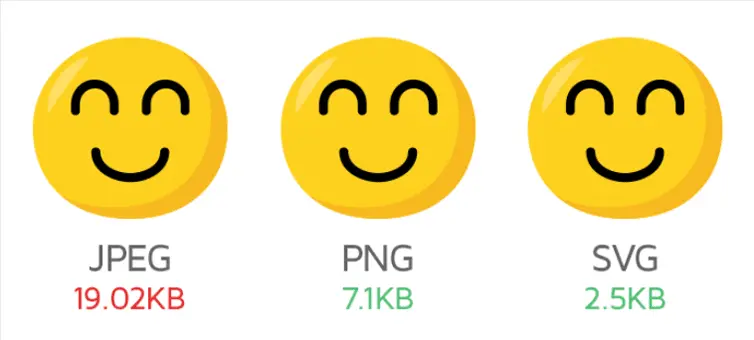 Picture and file dimension comparability between JPEG, PNG, and SVG.
Check and Monitor Your Web page With GTmetrix
Use GTmetrix to test the efficiency of your web page earlier than and after you employ Imagify to see how a lot your web page efficiency improves.
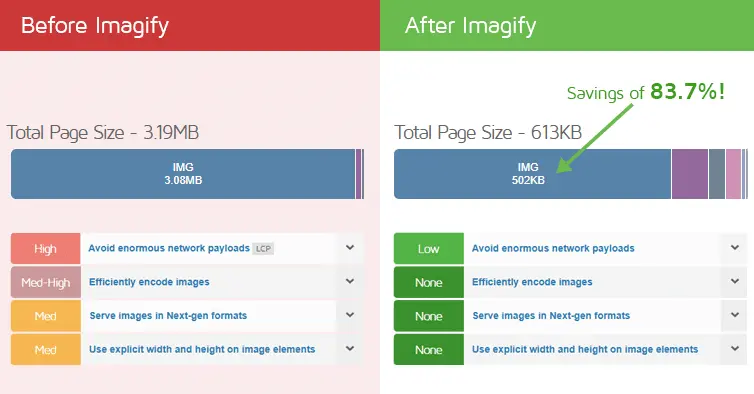 Imagify not solely decreased the whole picture weight by almost 84%, but additionally fastened a number of image-based audits highlighted by GTmetrix.
We’d additionally extremely suggest monitoring your web page after you’ve optimized it to keep watch over your web page efficiency.
Ultimate Ideas
Photographs are sometimes the heaviest media/file kind on the web page, and optimizing them is without doubt one of the best but rewarding duties you are able to do to enhance your website’s efficiency.
Imagify makes picture optimization easy, and improves your website velocity, search engine optimization, and web page expertise on your guests.
Use this information to present Imagify a attempt – it’s free to make use of, and also you solely must improve in the event you want extra credit.
Optimize WordPress Photographs with Imagify
Compress and optimize all of your WordPress photos utilizing Imagify.
Resize, compress, and even convert photos to WebP or AVIF with just some clicks.